Shortnoob Explained: Features, Safety, and How to Use It
You found a YouTube Short worth keeping. Maybe it’s a recipe, a workout clip, or a reference for your own edit. Then a search led you to a name you’ve never seen: shortnoob.
So what is it, and should you trust it? This guide covers what the tool claims to do, how beginners use it, the safety risks of free downloaders, and the copyright rules that catch people off guard. I’ll be upfront about what I could verify and what I couldn’t.
What Is Shortnoob?
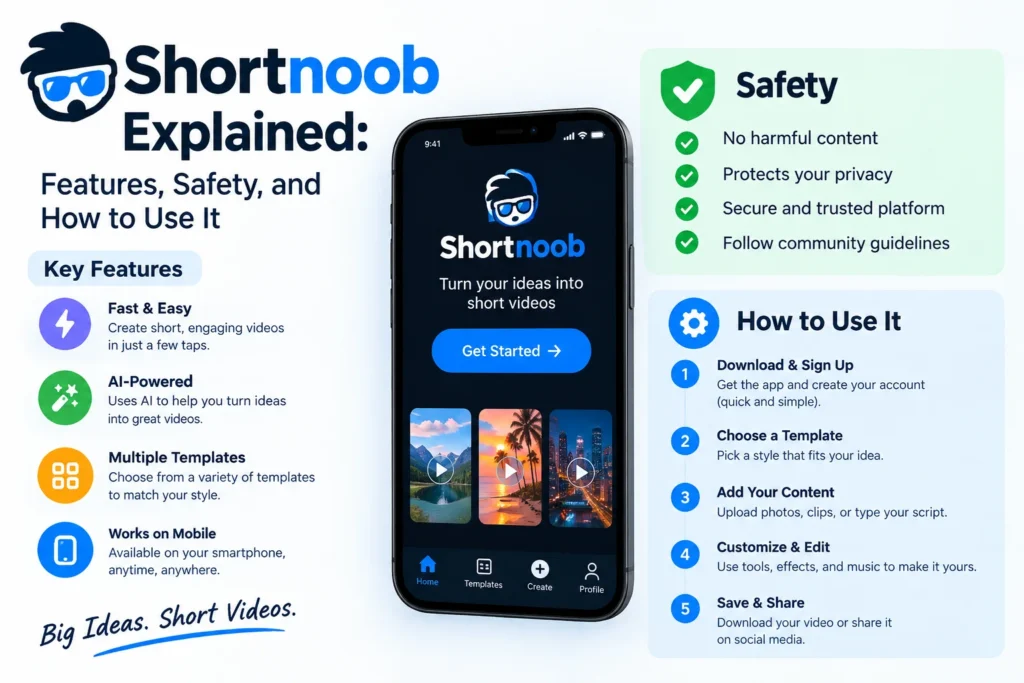
“Shortnoob” usually refers to ShortsNoob, a free web-based downloader for YouTube Shorts. A directory listing describes it as a no-signup tool that also supports Instagram and Facebook videos, with MP4 and MP3 conversion, HD and 4K quality, subtitle downloads, and batch options.
Here’s the catch. That description comes from a listing with zero user reviews, so it’s the tool’s own pitch, not independent proof. I haven’t confirmed every feature, and you shouldn’t assume each one works as advertised.
The spelling trips people up, too. Most searchers type “shortnoob,” while the service itself appears as ShortsNoob. Same thing, different spelling.
How to Use It in 4 Steps
The flow below is typical for browser-based downloaders. Menus on the actual site may differ.
- Open the Short in the YouTube app, tap Share, and copy the link.
- Paste the link into the input box.
- Choose MP4 for video or MP3 for audio, then pick a quality level.
- Hit download and check that the file plays before you close the tab.
One tip from basic web hygiene: if a pop-up asks you to install an extension or app, close it. A downloader that runs in the browser doesn’t need one.
Features at a Glance
| Feature | Claimed | What it means for you |
|---|---|---|
| No signup | Yes. | Fewer personal details handed over |
| MP4 and MP3 | Yes. | Keep the video or just the audio. |
| HD/4K | Yes. | Output depends on the original upload. |
| Batch downloads | Yes. | Faster, but raises more terms-of-service questions |
| Subtitles | Yes. | Handy for study and translation |
Pros: free, no account, simple process. Cons: ad-supported, unverified claims, legal gray area.
Is Shortnoob Safe?
I can’t vouch for any specific site’s security, and I’m not a cybersecurity researcher. What I can tell you is where the risk usually sits. Free downloaders pay their bills with ads, and ads are where fake download buttons and malware tend to hide.
A few habits help:
- Run an ad blocker and keep your browser updated.
- Never enter your Google login or card details.
- Skip anything asking for admin permissions or an APK install.
- Scan files before opening them.
If something feels off, leave. Honestly, that instinct is right more often than not.
Is Downloading Shorts Legal?
Here’s the part most beginners skip. YouTube’s Terms of Service tell users not to download content unless YouTube itself displays a download link for it. I reviewed an archived copy of those terms, so check the current wording yourself.
Copyright is a separate layer. Saving a video for private viewing is treated differently from redistributing it, and sharing copyrighted material without permission is almost always a problem. Rules vary by country, and this isn’t legal advice.
Safer routes exist:
- Download your own uploads through YouTube Studio. YouTube provides creators with official tools for this.
- Look for Creative Commons videos and follow the license terms.
- Ask the creator for written permission.
Does a “personal use” label protect you? Not automatically. It may lower the practical risk, but it doesn’t change the terms you agreed to.
Alternatives Worth Considering
If you only need offline viewing, offline downloads inside the YouTube app through Premium are the cleanest option because they work within the rules. Saving a song to a playlist or watch The later list is free and keeps the creator credited. For editing references, ask the creator for the original file. Slower, yes. Safer, also yes.
Desktop apps and other web tools exist, but they raise the same terms and safety questions.
FAQ: Shortnoob Questions
Q: What is a shortnoob?
A: It’s a free online tool, listed as ShortsNoob, that claims to download YouTube Shorts as MP4 or MP3 without a signup.
Q: Is Shortnoob free?
A: Its listing shows no pricing and describes it as free. Expect ads.
Q: Is Shortnoob safe to use?
A: I couldn’t verify its security. Use an ad blocker, install nothing, and never share logins or payment details.
Q: Is it legal to download YouTube Shorts?
A: YouTube’s terms prohibit downloads unless the platform offers a download link, and copyright may also apply. This isn’t legal advice.
Q: Can I download my own Shorts?
A: Yes. YouTube Studio lets creators download their own uploads.
The Bottom Line
Shortnoob looks like a simple, free way to save Shorts, but its claims are unverified, and the real risks sit in the ads and in YouTube’s terms. If you use it, protect yourself, and stick to your own videos or properly licensed ones.
Want to keep a short without any worry? Save it to a playlist. Come back to the downloader question when you actually need a file.