
What Is a Microcontroller? A Beginner’s Guide (2026)
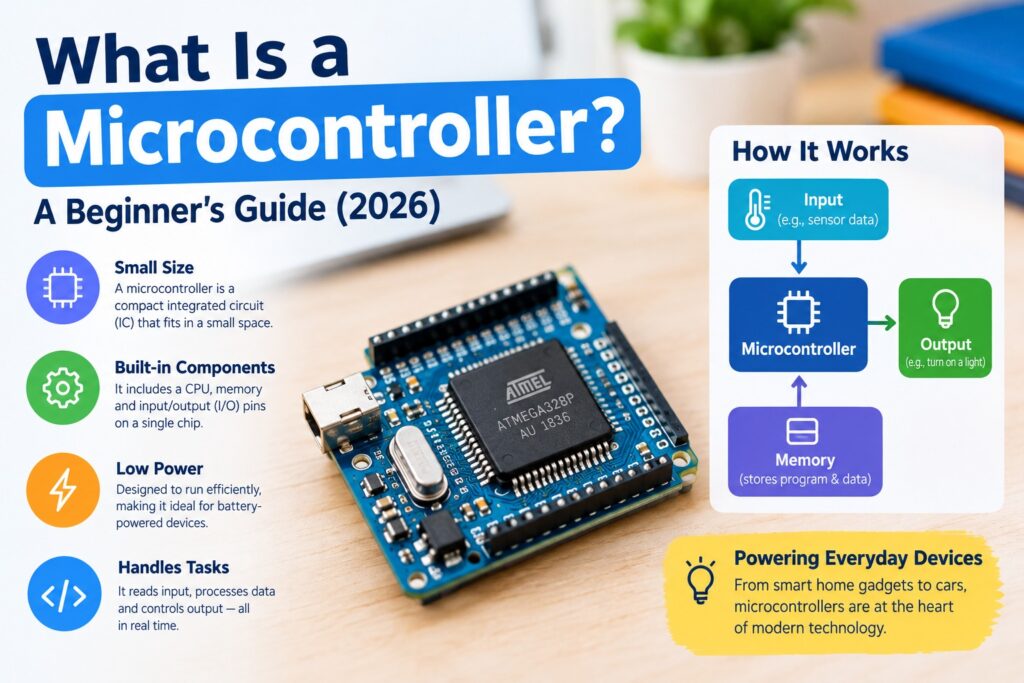
Your microwave beeps. Your car unlocks. Your fitness band counts steps. Something small runs each of those jobs, and it isn’t a full computer. It’s a microcontroller.
So what is a microcontroller, exactly? It’s a chip that packs a processor, memory, and input/output connections into one package, built to control one specific thing. This guide skips the jargon, walks through how it works, and points you to a sensible first board.
What Is a Microcontroller?
A microcontroller, often shortened to MCU, is a tiny computer on a single chip. Its job is to read signals from the world, make a quick decision, and send a signal back out. Nothing more. IBM’s explainer describes it as a chip that manages specific tasks inside an embedded system without needing a complex operating system.
Think of a thermostat. It doesn’t browse the web or play video. It checks the temperature, compares it to your setting, and switches the heat on or off. That single, repeated loop is what this kind of chip does best.
“Embedded” is the key word. The chip sits inside another product, hidden from view, and you never talk to it directly. Your laptop is a general-purpose machine that runs thousands of programs. An MCU runs one program, usually forever.
What Is Inside a Microcontroller?
Four main parts share one piece of silicon.
The CPU is the decision-maker. It fetches an instruction, works out what it means, and carries it out. Epson’s introduction to the subject compares it to the chip’s brain.
Memory comes in two flavors. Flash memory stores your program and keeps it when the power is off. RAM holds temporary values while the program runs, and it forgets everything the moment power disappears. Beginner boards have far less of both than a phone. Think kilobytes, not gigabytes.
Input/output pins, usually called GPIO (general-purpose input/output), connect the chip to buttons, sensors, lights, and motors. A pin reads a voltage as on or off or sends one out.
Peripherals are the built-in extras. Timers count precisely. Analog-to-digital converters (ADCs) turn a sensor’s smooth voltage into numbers. Communication blocks such as UART, SPI, and I2C let the chip talk to other parts.
Here’s what beginners often miss: because all of this lives on one chip, you don’t wire up separate memory or support chips. That’s the whole trick.
How a Microcontroller Works: A Step-by-Step Example
Let’s follow a simple gadget: a desk fan that switches on when the room gets warm. (This is a teaching example, not a build log. [ADD YOUR EXPERIENCE: one or two sentences about the first circuit you built or tested.])
- Power on. The chip resets and starts running its stored program from the first instruction.
- Read the input. A temperature sensor connects to a pin. The ADC converts its voltage into a number, say 31 for 31°C.
- Decide. The CPU compares that number to a limit in the program, for example, 28.
- Act. 31 is higher than 28, so the program sets an output pin high. That pin drives a transistor, which switches the fan on.
- Repeat. The loop restarts, often thousands of times per second.
Sense, decide, act. That cycle sits at the core of almost every embedded gadget. Epson describes the internals in a similar way, with a program counter stepping through stored instructions one at a time.
Speeds are modest. IBM notes these chips typically run at clock speeds up to about 200 MHz, while desktop processors pass 1 GHz. Slow isn’t a flaw here. A fan doesn’t need billions of decisions per second, and a slower chip costs less and sips power.
Microcontroller vs. Microprocessor: What’s the Difference?
People mix these up constantly, and honestly, the names don’t help.
A microprocessor is essentially just the CPU. To build a working computer, you add separate memory chips, storage, and input/output hardware around it. That’s how PCs and servers are made. An MCU packs those pieces together, so it runs with very few outside parts.
| Microcontroller | Microprocessor | |
|---|---|---|
| Memory and I/O | Built in | External chips |
| Best for | One dedicated task | General computing |
| Typical speed | Up to about 200 MHz | Often above 1 GHz |
| Power use | Very low | Higher |
| Cost | Low | Higher, plus support parts |
Neither one wins. A smartwatch controller and a laptop’s main processor solve different problems. Choosing the wrong type just costs you money, battery life, or both.
Where Are Microcontrollers Used?
A few dozen probably sit within arm’s reach right now. Common homes for them:
- Kitchen: microwaves, rice cookers, coffee makers
- Around the house: washing machines, air conditioners, remote controls, door locks
- Cars: engine control, airbags, anti-lock brakes
- Health: thermometers, blood pressure monitors, glucose meters
- Wearables: watches, fitness bands, smart bulbs
Epson gives a neat reason for the design: a PC-grade processor in a wristwatch would drain the battery fast. Chips are chosen to fit the product, not to be as quick as possible.
Types of Microcontrollers and Beginner Boards
The first one appeared in 1971, credited by IBM to Texas Instruments engineers Gary Boone and Michael Cochran. Today they’re usually grouped by how much data they handle at once. 8-bit chips are the simplest and turn up in toys and remote controls. 16-bit chips appear in medical and automotive gear. 32-bit chips are the most capable and run more demanding devices. Families such as ARM-based and PIC chips cut across those groups.
For your first project, you won’t buy a bare chip. Epson points out that a bare chip needs a development environment before you can do anything with it. So you buy a development board, which adds power, a USB port, and labeled pins. Popular starters:
- Arduino Uno: 8-bit chip, friendly Arduino IDE, huge tutorial library
- Raspberry Pi Pico: a microcontroller board (not the full Raspberry Pi computer), programmable in MicroPython or C/C++
- ESP32 boards: built-in Wi-Fi and Bluetooth for connected projects
Check current prices and availability before buying.
Common Beginner Mistakes
- Mixing up the board and the chip. An Arduino is a board built around a microcontroller. The chip is just one part of it.
- Wrong voltages. Feeding 5 V into a 3.3 V pin, or skipping the resistor on an LED, can damage a board. Read your board’s specs first.
- Starting too big. Blink an LED before you attempt a robot. It feels silly. Do it anyway.
- Forgetting how little RAM you have. Large variables can crash a program on small chips.
- Ignoring the datasheet. It’s dull, but it answers most “why won’t this work?” questions.







1 thought on “What Is a Microcontroller? A Beginner’s Guide (2026)”