What Is a Checksum? Simple Guide With Examples (2026)
You download a 4 GB installer, and the site shows a long string of letters and numbers beside the button. Most people scroll right past it. That string is a checksum, and it’s the fastest way to learn whether your file is the one the publisher actually sent.
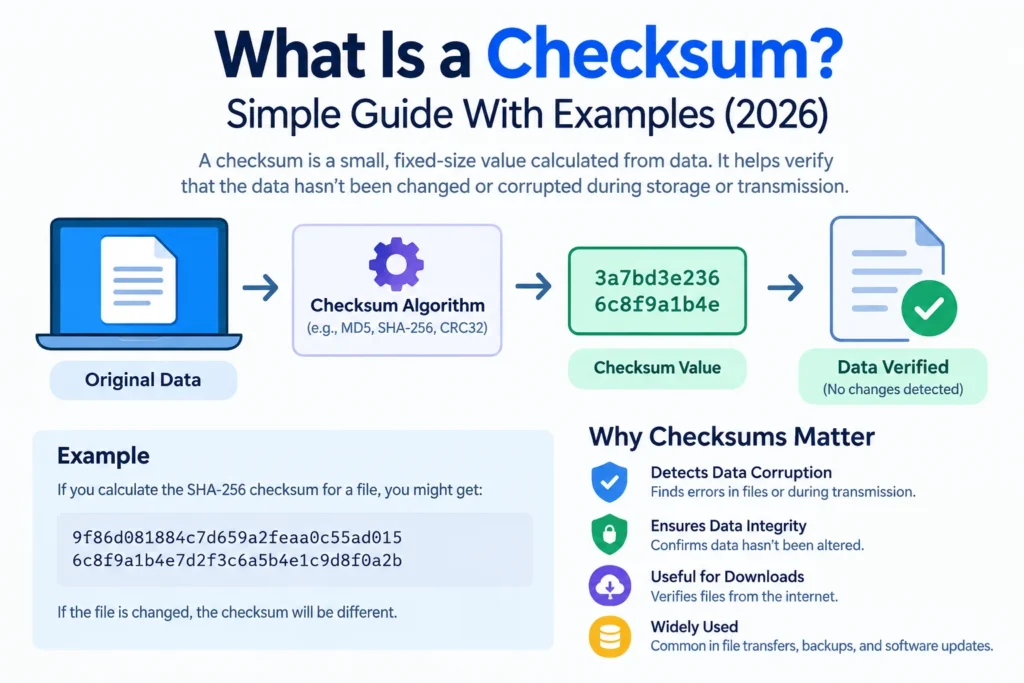
So, what is a checksum? It’s a short value calculated from a piece of data. Change the data, even by one character, and the value changes too. Compare two values and you know whether two copies match.
Below, you’ll see how the math works, how the main algorithms differ, and how to check a file yourself in about a minute.
What Is a Checksum?
A checksum is a fixed-length value that a formula produces from a file, message, or block of data. Think of it as a fingerprint for that exact content. Identical files give identical values. Files that differ by a single byte almost never do.
Here’s the useful part. You don’t compare the files. You compare their fingerprints, which are tiny, so the check takes a second even when the files run to gigabytes.
One early misunderstanding is worth clearing up. A checksum isn’t encryption. It hides nothing, and nobody can rebuild the original file from it. It answers a single question: is this still the same data?
Why Do Checksums Matter?
Data gets damaged more often than you’d think. A dropped connection can cut a download short. A failing drive can flip bits in a file nobody has opened in years. Sometimes a mirror site serves a copy someone has modified. None of this announces itself, and a damaged installer may run fine until it crashes at the worst moment.
A checksum turns silent damage into a visible mismatch. That’s the whole job, and it’s why downloads, networks, and storage systems all depend on it.
How Does a Checksum Work?
The process has three moves:
- The sender runs the data through a formula and gets a value.
- That value travels with the data or gets posted alongside it.
- The receiver runs the same formula on whatever arrived and compares the results.
Matching values mean the data very likely arrived intact. A mismatch means something changed along the way.
Want a toy version? Take the word “Hello” and add the ASCII code of each letter: 72 + 101 + 108 + 108 + 111 = 500. Divide by 256 and keep the remainder, and you get 244, which is F4 in hexadecimal. That’s a working checksum.
It also exposes the weakness of simple addition. Spell the word backwards, “olleH,” and the total is 500 again. Same letters, same sum, same result. Plain addition can’t see reordered data, so real algorithms mix the bytes far more aggressively.
Checksum vs. Hash vs. CRC: What’s the Difference?
People swap these terms constantly. They overlap, but they aren’t identical.
- Checksum is the broad label for any small value used to verify data.
- CRC (cyclic redundancy check) is a fast method built to catch accidental damage, like flipped bits on a noisy cable or a scratched disc. It wasn’t designed to stop a determined attacker.
- Cryptographic hash, such as SHA-256, is built to resist deliberate tampering. Nobody should be able to craft a different file that produces the same value.
CRC works like long division. It treats your data as one enormous binary number, divides it by a fixed polynomial, and keeps the remainder as the check value. Hardware does this extremely fast, and CRC-32 is guaranteed to catch any burst error up to 32 bits long.
Output length gives it away. CRC32 produces 8 hexadecimal characters, MD5 produces 32, and SHA-256 produces 64. Longer output means vastly more possible values, so accidental matches become absurdly unlikely.
Then there’s the avalanche effect. The SHA-256 of “hello” begins 2cf24dba5fb0. Capitalize the h, and it begins 185f8db32271. One letter changed, and the whole output looks unrelated. That behavior is what makes cryptographic hashes so hard to fake.
Can two different files share the same value? In theory, yes. Infinitely many possible inputs get squeezed into a fixed number of outputs, so overlaps must exist. With a 32-bit CRC, accidental matches are rare but real. With SHA-256, the odds are so tiny that nobody has ever found a collision.
| Algorithm | Output size | Typical use | Safe against tampering? |
|---|---|---|---|
| CRC32 | 32 bits | ZIP files, network frames | No |
| MD5 | 128 bits | Quick corruption checks | No |
| SHA-1 | 160 bits | Legacy systems only | No |
| SHA-256 | 256 bits | Downloads, certificates, updates | Yes |
Where You Already Use Checksums
You’ve relied on them today, probably without noticing.
Downloads. Publishers post a SHA-256 value beside ISOs and installers so you can confirm your copy is identical.
Networking. TCP, UDP, and IPv4 headers carry a 16-bit Internet checksum, described in RFC 1071. Packets that fail the check get discarded, and TCP asks for a resend.
ZIP files. Each file inside an archive stores a CRC32, so your unzip tool can flag damage.
Card numbers. The last digit of a payment card is a check digit from the Luhn algorithm. Try the standard test number 79927398713. Starting with the second digit from the right, double every other digit, subtract 9 from any result above 9, then add everything up. You get 70, which divides evenly by 10, so the number passes. Mistype one digit and the sum breaks, which is why many checkout forms reject typos instantly.
How to Check a Downloaded File
It takes three steps and no extra software.
- Find the official value. Look on the publisher’s download page and note which algorithm it lists, usually SHA-256.
- Calculate your own. Open a terminal and run the command for your system:
- Windows PowerShell:
Get-FileHash .\setup.iso -Algorithm SHA256 - macOS:
shasum -a 256 setup.iso - Linux:
sha256sum setup.iso
- Windows PowerShell:
- Compare. Every character has to match. Hexadecimal isn’t case sensitive, so
A3Fanda3fcount as the same.
Many Linux projects ship a checksum file, and it sha256sum -c CHECKSUM does the comparison for you, printing OK on a match. Use it when you can. Squinting at 64 characters is how mistakes happen.
If the values differ, delete the file and download it again from the official source.
What a Checksum Can’t Do
These checks are useful, but they have limits worth knowing.
Integrity isn’t authenticity. A match proves your file equals the value you compared it to. It doesn’t prove that value came from the publisher. If an attacker controls the download page, they can swap both the file and the number. That’s why Linux distributions pair SHA-256 with GPG signatures: the hash shows the file is unchanged, and the signature shows who made it.
Older algorithms are broken for security. Researchers at CWI Amsterdam and Google produced the first practical SHA-1 collision in 2017, and NIST says SHA-1 should be phased out by December 31, 2030 in favor of SHA-2 or SHA-3. MD5 fell earlier. For anything security-related, pick SHA-256 or stronger.
They detect, but they don’t repair. A mismatch says something’s wrong, not what or where. You re-download or restore from a backup.
Common Mistakes to Avoid
- Comparing only the first few characters. A sloppy paste can hide a difference further along.
- Mixing algorithms. An MD5 result never matches a published SHA-256 value, and the mismatch looks exactly like corruption.
- Trusting a value from the same compromised page. Get it from a second place when the file matters.
- Checking a half-finished download. Wait until the transfer completes.
- Moving text files in the wrong mode. ASCII-mode transfers can change line endings and quietly alter the result.
FAQ: Checksum Questions
Q: What is a checksum in simple terms? A: It’s a short fingerprint calculated from data. If the data changes, the fingerprint changes, so you can tell whether two copies match.
Q: Is a checksum the same as a hash? A: Not exactly. A hash function turns any input into a fixed-size value, and when that value is used to check data, it works as a checksum. CRCs catch accidents, while cryptographic hashes also resist tampering.
Q: What does a checksum mismatch mean? A: Your data differs from the original. Common causes are an interrupted download, failing storage, or the wrong algorithm. Tampering is possible but rarer, so re-download from the official source.
Q: Which checksum algorithm should I use? A: SHA-256 for verifying files and anything security-related. CRC32 works for spotting accidental damage where speed matters. Skip MD5 and SHA-1 when tampering is a concern.
Q: Can you get the original file back from a checksum? A: No. The value is far smaller than the data, so most of the information is gone by design.
Q: How long is a SHA-256 checksum? A: 256 bits, shown as 64 hexadecimal characters.