
How to Use the NC Secretary of State Business Search
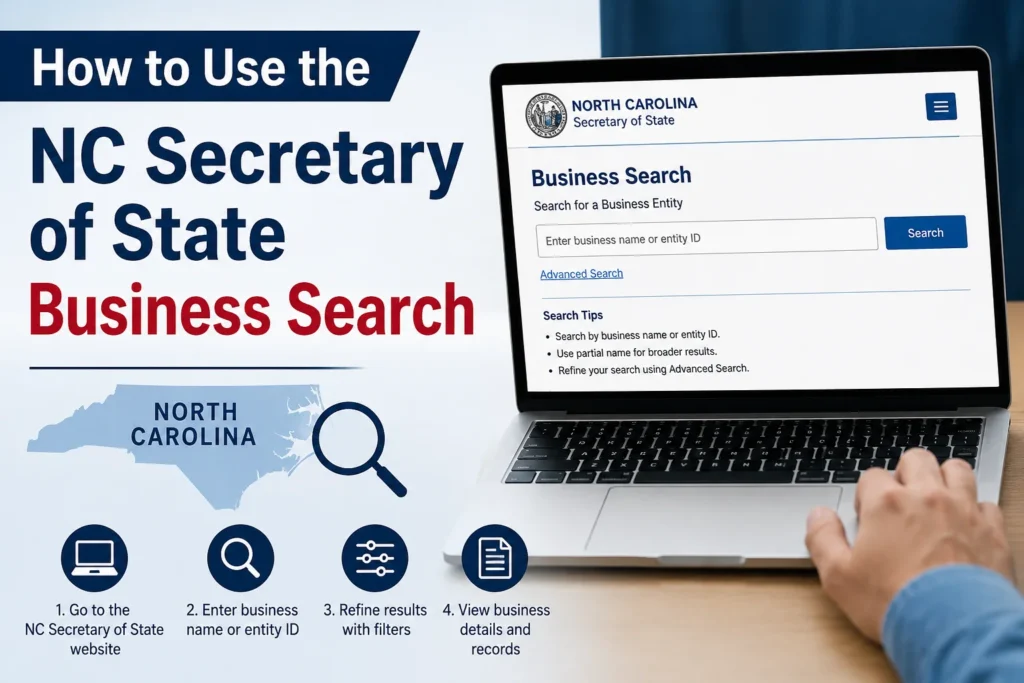
Trying to check if a company is real before you sign a contract with it? Or maybe you’re starting an LLC and need to know if your name is already taken. Either way, the tool you want is the NC Secretary of State business search, and it’s free, public, and lives right on sosnc.gov.
Here’s how it works, what you’ll find, and a few things people get wrong the first time.
What the NC Secretary of State Business Search Actually Does
The North Carolina Secretary of State’s office runs the state’s official registry for every corporation, LLC, limited partnership, and nonprofit formed or registered to do business in the state. The search tool sits on top of that registry, so it’s pulling from the same records the state itself uses, not a third-party copy that might be stale.
Run a search, and you’ll typically see:
- The entity’s legal name and any assumed (DBA) names on file
- Entity type, status (active, dissolved, administratively suspended), and formation date
- Principal office address
- Registered agent name and address
- A SOSID, the unique number North Carolina assigns to every registered business
- Filing history: articles of incorporation, annual reports, amendments, mergers
One quirk worth knowing: you don’t need to type “LLC,” “Inc,” or an ampersand into the search box. The state’s own guidance says to leave those off, since the system already accounts for them, and including them can actually narrow your results too much.
Step-by-Step: Running a Search
Go to the official page. Search from sosnc.gov directly, under Online Services. Third-party lookup sites will often mirror this data, but there’s no reason to use one when the source is free and current.
Pick your search type. You’re not limited to searching by company name. You can also search by registered agent, by company official (an officer or director), by SOSID if you already have it, or by assumed name if you’re trying to trace a trade name back to the legal entity behind it.
Enter a partial name if you’re not sure of the exact one. The system matches on partial strings, so “Carolina Build” will surface “Carolina Building Group LLC” without you needing the full, exact title.
Open the entity’s profile. Click through to see status, filing history, and registered agent details. This is where you’d confirm a business is actually in good standing, not just that it exists somewhere in the database.
Order a certificate if you need proof. If a bank, landlord, or out-of-state agency wants official confirmation, you can order a Certificate of Existence (sometimes called a Certificate of Good Standing) straight from the same portal, usually for around $10 to $13, delivered as a downloadable PDF.
Checking Name Availability Before You File
If you’re forming a new LLC or corporation, the business search doubles as a name-availability check. Search your proposed name first. If nothing comes back, or nothing “too similar” comes back, you’re generally clear to move forward. North Carolina also lets you reserve a name for up to 10 years by filing a separate reservation form, which is worth doing if you’re not ready to file formation documents yet but want to lock the name down.
Business Search vs. UCC Search: Don’t Mix These Up
This trips people up constantly. The business entity search and the UCC (Uniform Commercial Code) search are two separate systems on two separate pages. The entity search tells you whether a company exists and is in good standing. The UCC search, run through the Secretary of State’s UCC division, tells you whether there are liens filed against a business’s assets, which matters if you’re buying equipment, extending credit, or doing due diligence on a company’s financial obligations. If you only run the entity search, you’ll miss lien information entirely, and vice versa.
Common Mistakes to Avoid
A few things worth flagging before you dive in:
- Typing the full legal suffix (“LLC,” “Corp”) can suppress matches. Search the core name instead.
- Automated or scripted searches aren’t allowed under the site’s terms, and heavy repeated queries can get your access throttled. If you need bulk data, the state offers a separate Data Subscription Service built for that.
- An “active” status doesn’t automatically mean a company has filed every required annual report on time. Check the filing history tab, not just the status label, if timeliness matters to your situation.
FAQ: NC Secretary of State Business Search
Q: Is the NC Secretary of State business search free? A: Yes. Basic entity searches are free. Certified documents and certificates carry a small fee, typically under $15.
Q: How do I find a company’s registered agent in North Carolina? A: Search the entity by name, open its profile, and the registered agent’s name and address appear alongside the principal office information.
Q: Can I search by SOSID instead of company name? A: Yes, if you already have the entity’s SOSID, that’s the fastest and most exact way to pull up its record.
Q: Does the business search show UCC liens? A: No. Liens are handled through a separate UCC search on the Secretary of State’s UCC division page, not the entity search.
Q: How current is the information in the database? A: The tool pulls in real time from the state’s own filing system, so it reflects the most recent processed filings, not a periodically updated copy.
Bottom Line
The NC Secretary of State business search is the fastest, most reliable way to verify a North Carolina business, check name availability before filing, or pull an entity’s filing history. Search by partial name without the legal suffix, remember that liens live in a separate UCC system, and order a certificate directly from the same portal if you need official proof of standing.








1 thought on “How to Use the NC Secretary of State Business Search”