
How to Use the PA SOS Business Search Tool
Starting a business in Pennsylvania? Before you file anything, you need to know if your business name is even available. That’s where the state’s official lookup tool comes in, and it’s simpler to use than most people expect once you know where to click.
What Is the PA SOS Business Search?
“PA SOS” is short for the Pennsylvania Secretary of State, though the office that actually runs this tool is the Department of State’s Bureau of Corporations and Charitable Organizations. The search itself lives at file.dos.pa.gov, and it’s the state’s public database of every registered business entity in Pennsylvania: corporations, LLCs, limited partnerships, and more.
Think of it as a name check and status check rolled into one. You can use it to confirm a name isn’t already taken, look up an existing company’s filing history, or check whether a business is still active before you sign a contract with it. It’s free, it’s open to anyone, and you don’t need an account to run a basic search.
One thing worth knowing up front: sole proprietorships won’t show up here. Only formally registered entities appear in the database, since sole proprietorships aren’t filed with the state the same way an LLC or corporation is.
Why You’d Actually Use It
Most people land on this tool for one of three reasons.
Naming a new business. Pennsylvania requires your entity name to be distinguishable from every other name already on file. If it’s too close to an existing business, your filing gets rejected. Running a search first saves you the wasted filing fee and the delay.
Checking an entity’s status. Maybe you’re about to sign with a vendor, or you’re doing due diligence before a deal. The search tells you whether a company is active, dissolved, merged, or has had a name change.
Pulling filing history. You can see when a business was formed, what type of entity it is, and whether recent filings have been processed.
Step-by-Step: Running a Search
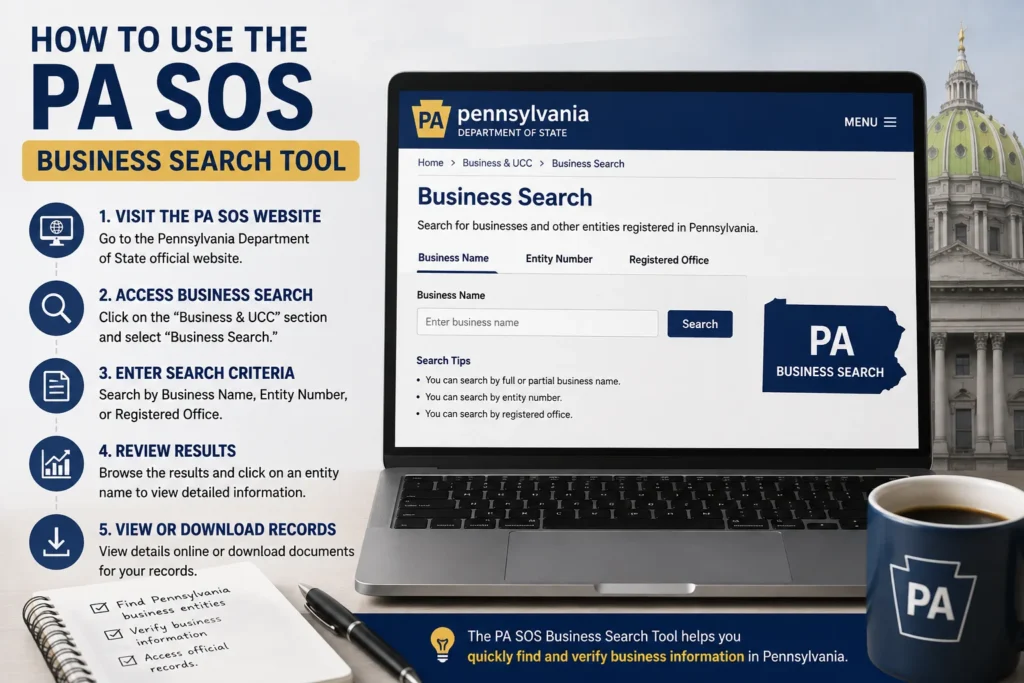
- Go to the official portal. Visit file.dos.pa.gov and select Business Entity Search. Skip any third-party site that charges a fee for this; the state’s version is free.
- Enter your search term. You can search by entity name or by entity number if you already have it. A tip that trips people up: if your target name has several words, try searching just the first two. The system won’t always catch partial matches, so a shorter search string tends to surface more results.
- Review the results list. Each match shows the entity name, its number, business type, and current status.
- Click into a specific entity. This opens a detail page with filing dates, registered office information, and, when available, officer or general partner names.
- Check the “as of” processing date. The homepage tells you exactly which filing date the database is current through, since there’s usually a short lag between when a document is filed and when it appears online.
If the online tool isn’t cutting it, the bureau also handles phone requests. Representatives can search up to two entity names per call and will confirm details like filing date, status, and business type. That line runs weekday mornings and afternoons, 8:00 a.m. to 4:45 p.m., at (717) 787-1057. For a full written filing history, you can request one by mail for a $15-per-entity fee.
What You Won’t Find in the Database
The search has real limits, and knowing them upfront prevents wasted time. Records aren’t indexed by officer name, so you can’t search “who owns this company” directly. There’s also no listing by business address, tax ID, or industry type. And personal details like officer addresses, stockholder names, or phone numbers simply aren’t part of the public record.
Reserving a Name Once You Find One
Found an available name and not ready to file yet? You can lock it down with a name reservation. In Pennsylvania this costs $70 and holds the name exclusively for 120 days under state regulation. Most reservations run that standard four-month window, though certain banking and savings association filings get a longer six-month hold.
The Annual Report Change You Should Know About
Pennsylvania overhauled its reporting requirement recently, and it directly affects any entity you look up. Under Act 122 of 2022, the old ten-year “decennial report” was replaced with an annual report requirement for both domestic and foreign filing associations, starting January 1, 2025. Most for-profit entities pay a $7 filing fee; nonprofits pay nothing.
Here’s the part that matters for search results: the state gave businesses a grace period through 2026, meaning a missed report during that window won’t trigger dissolution. That changes starting with reports due in 2027. From that point on, a missed annual report leads to administrative dissolution six months after the due date, and the entity loses protection over its registered name. If you’re vetting a company for a partnership or acquisition, this is one more reason to check current status rather than relying on old information.
Also worth knowing: Pennsylvania doesn’t issue anything called a “Certificate of Good Standing.” If you need proof an entity is in good standing, ask for the state’s equivalent certificate, since the naming is different from what most other states use.








1 thought on “How to Use the PA SOS Business Search Tool”