
What Is a Bootloader? A Plain-English Guide to Booting
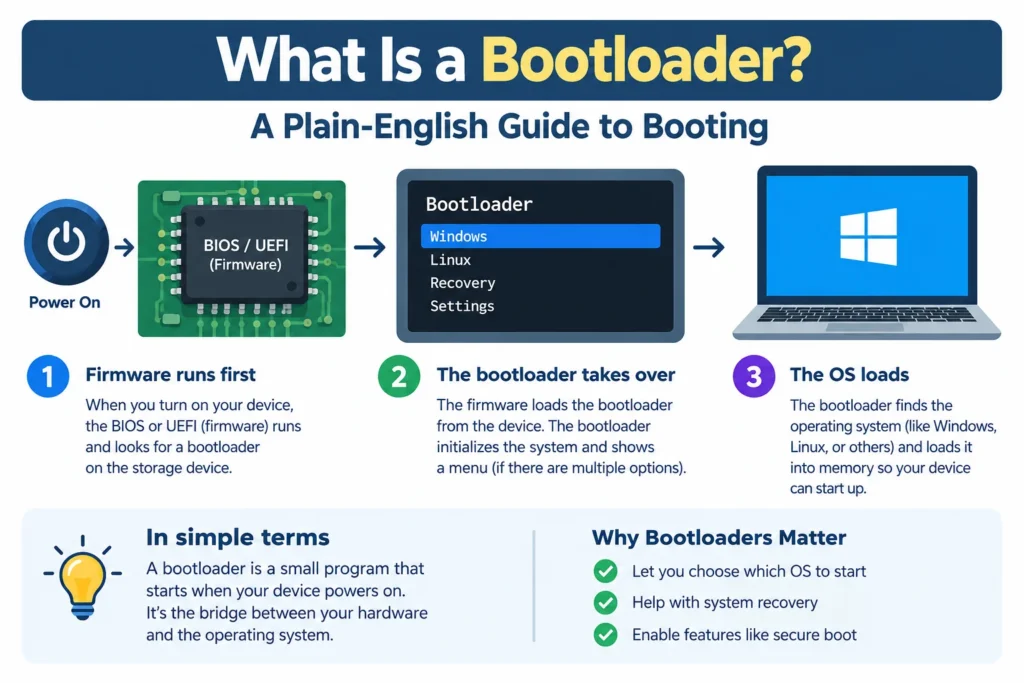
Press the power button and, a few seconds later, an operating system appears. Something has to make that happen, and it isn’t the operating system itself. A bootloader is the small program that copies an operating system’s kernel into memory and hands over control so the device can actually start. Laptops, phones, routers, and car dashboards all depend on one. This guide covers what the startup code does, how the boot sequence runs, how PC, embedded, and phone versions differ, and what “unlocking” really means.
What Does a Bootloader Do?
When power goes off, the operating system rests on storage, not in memory. At startup, the processor has only a small piece of code stored in firmware, and that code can’t run a modern operating system by itself. It needs help.
That help is the bootloader. It prepares the hardware, finds the kernel (the core of the operating system), copies it into RAM, passes along startup settings like the kernel command line, and then steps aside. Some versions also show a menu so you can pick between several operating systems, which is why you’ll sometimes hear the term “boot manager.”
The name is short for “bootstrap loader,” a nod to the old phrase about pulling yourself up by your own bootstraps. A machine with nothing loaded has to start itself somehow. That’s the whole idea.
How the Boot Process Works, Step by Step
Details vary by hardware, but on most PCs the sequence looks like this:
- Power on. The processor starts running firmware from a fixed spot in ROM or flash memory.
- Hardware check. The firmware, either legacy BIOS or modern UEFI, sets up the basics and builds a list of available drives.
- Find the boot code. BIOS reads the first 512-byte sector of the drive, known as the Master Boot Record. UEFI instead looks in a dedicated EFI System Partition for an .efi program.
- Run the boot program. The firmware loads that code and jumps to it. Since the first stage is tiny, it often just loads a bigger second stage. GRUB, common on Linux, works this way.
- Load the kernel. The bootloader locates the kernel on disk, copies it into RAM, and hands over its startup parameters.
- Handoff. The kernel takes over, starts drivers and services, and you land on a login screen.
The whole thing takes seconds. A failure at any step gives you a black screen or a message like “no bootable device.” Honestly, that error is how most people meet this software for the first time.
Types of Bootloaders: PC, Embedded, and Phone
On desktops and laptops, you’ll run into GRUB (the usual pick on Linux and handy for dual booting) and Windows Boot Manager, which Microsoft has used since Windows Vista. Apple builds its own for Macs.
In embedded devices such as routers, cameras, and industrial controllers, there’s no BIOS at all. The boot code is the first thing that runs, so it does the firmware’s job too. U-Boot is a widely used open-source option for ARM and PowerPC boards. Many of these programs accept new firmware over UART, USB, Ethernet, or wireless links, which is what makes remote updates possible. Well-built ones keep a fallback copy, so a botched update doesn’t leave a dead device.
On phones, startup is a chain. On Qualcomm chips, a primary loader in on-chip ROM starts the hardware and loads a secondary one from flash, which then loads the final stage. Android’s own documentation describes the final stage as a vendor-specific image that brings up the kernel. It also protects device state, initializes the Trusted Execution Environment, and checks the boot and recovery partitions before handing off.
Same job, different shapes. A laptop’s version can be swapped out in an afternoon, while a phone’s is tied tightly to the chipset.
Bootloader Security: Why Attackers Care
Whatever runs first controls everything after it. That’s why manufacturers treat the boot chain as the root of trust. Secure boot checks the digital signature of each stage before running it, so tampered or unsigned code gets refused. Android’s Verified Boot applies the same principle, confirming that executed code comes from a trusted source.
Attackers know this. A bootkit is malware planted in the startup chain, and it can persist even after you reinstall the operating system. Other weak points include firmware images that don’t get signature checks and buffer overflows, where code fails to check how much data it’s receiving.
My take: secure boot is one of the few protections worth leaving on for almost everyone. Most mainstream Linux distributions support it, so dual booting rarely needs it disabled.
Locked vs. Unlocked Bootloaders
A locked bootloader only runs software signed by the manufacturer. An unlocked one lets you flash a custom ROM, gain root access, or install a different operating system.
The trade-off is real. Unlocking gives you freedom and sometimes extra years of updates on older hardware. It also usually wipes your data, weakens verified boot, can void a warranty, and may cause some banking or payment apps to refuse to run.
On Android, the process generally involves switching on OEM unlocking in developer options, then using a tool called fastboot. Steps differ by brand, and some carriers block it entirely. iPhones can’t be unlocked at all.
Common Mistakes
- Overwriting the boot program. Installing Windows after Linux usually replaces GRUB, and the Linux install seems to vanish until you repair it.
- Mixing BIOS and UEFI modes. Install in one mode and boot in the other, and you get “no bootable device.”
- Unlocking without a backup. The wipe is automatic and unforgiving.
- Flashing the wrong file. A startup image built for a different model can brick a device.
FAQ: Bootloader Questions
Q: Is a bootloader the same as firmware?
A: No. Firmware such as BIOS or UEFI starts first and finds the bootloader, which then loads the operating system. On simple embedded devices, one program can play both roles.
Q: Where is a bootloader stored?
A: Either in the first sector of the boot drive or on a dedicated partition. On phones and boards, it lives in flash or ROM.
Q: What’s the difference between a bootloader and a kernel?
A: The bootloader gets the kernel into memory. The kernel then runs the operating system.
Q: Can a bootloader be updated?
A: Yes. Linux distributions update GRUB through the package manager, phone makers ship updates with system releases, and embedded devices often update over the air. A bad flash can brick the device, though.
Q: Is unlocking a bootloader safe?
A: It’s manageable but risky. Expect a data wipe and weaker security, so back up first and only unlock if you need the freedom.
Q: What happens if a bootloader gets corrupted?
A: The device won’t start, usually showing a black screen or an error. Recovery typically means a bootable USB drive on a PC or a recovery mode on a phone.
The Short Version
A bootloader is the quiet middleman of every startup: a small program that wakes up, checks its surroundings, loads the kernel, and gets out of the way. When your device boots in seconds, a chain of tiny programs has just verified and started each other in order. If this sparked your curiosity, the natural next read is how UEFI differs from the older BIOS.








1 thought on “What Is a Bootloader? A Plain-English Guide to Booting”