
How to Use SaveTheVideo to Download Videos Online
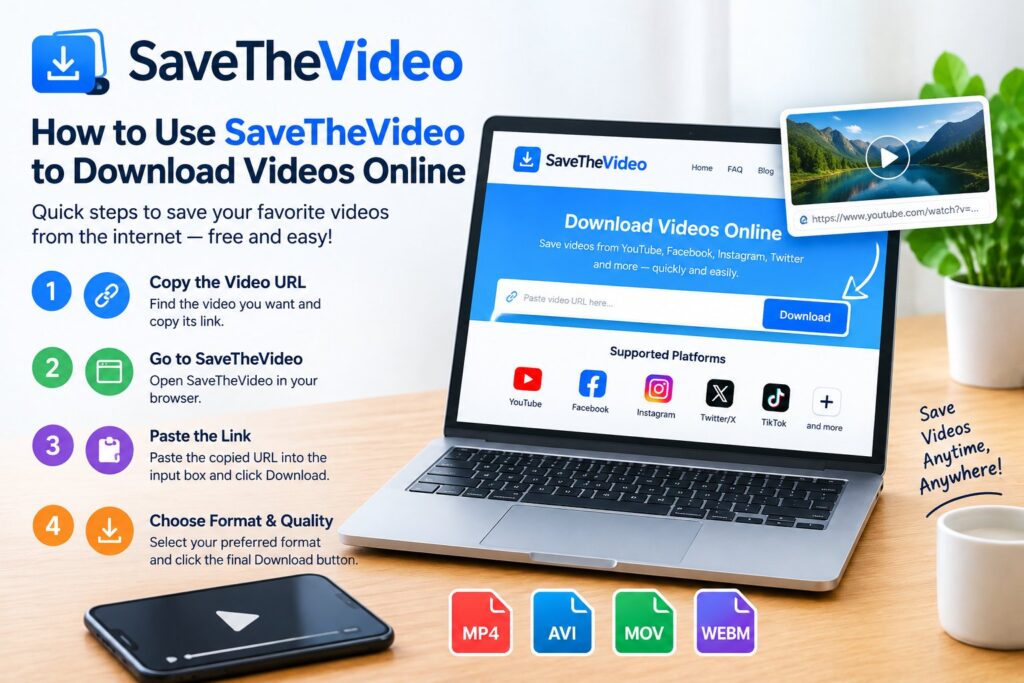
You found a clip you want to keep, maybe a tutorial, a friend’s Instagram Reel, or a TikTok you know you’ll want later, and the platform gives you no obvious way to save it. That’s the exact gap SaveTheVideo was built to close. It’s a free, browser-based tool for pulling video and audio files from sites like Twitter/X, Facebook, Instagram, TikTok, Vimeo, and Dailymotion, without installing anything.
This guide walks through exactly how the tool works, what it can and can’t do, how it compares to similar services, and what you need to know legally before you hit download.
What Is SaveTheVideo?
SaveTheVideo is an online video downloader and converter. Instead of a desktop app, it runs entirely in your browser: You paste a link, the site fetches the available video and audio streams, and you pick a format to download. No account, no software, and no browser extension required.
It works across most major devices, Windows, macOS, iOS, Android, and Linux, because there’s nothing to install. The core function is simple, but a few extras make it more useful than a bare-bones link-paster:
- Multiple output formats (MP4, MP3, AAC, and others depending on the source)
- Basic editing before download, including trimming and merging clips
- Subtitle and closed-caption downloads where the original video has them
- A fallback download method for cases where the primary link fails
For someone who just wants one clip and doesn’t want to manage a downloader app for the rest of their life, that combination covers most everyday needs.
Step-by-Step: How to Download a Video
The process is short. Here’s how it typically goes:
- Find the video on its original platform (Instagram, TikTok, Facebook, Twitter/X, Vimeo, Dailymotion, or another supported site).
- Copy the video’s link. On most platforms this means tapping “Share” and choosing “Copy Link,” or copying the URL straight from your browser’s address bar.
- Paste the link into the input field on SaveTheVideo’s homepage.
- Let it process. The site scans the link and pulls up the available formats and quality options.
- Choose your format and quality, then click download. The file saves to your device like any other download.
A couple of practical notes: mobile downloads sometimes route through your phone’s default Downloads or Files app rather than a visible progress bar, so check there if the file “disappears.” And if a link doesn’t process the first time, re-copying it and pasting it again often fixes the issue, since some platforms rotate or expire their video URLs quickly.
Which Platforms Does It Support?
SaveTheVideo covers a wide range of sites, though its strongest, most consistent support tends to be for:
Coverage can shift over time as platforms update their code, so a link that worked last month might occasionally need a workaround or might not process at all if the source has tightened its restrictions.
- Twitter/X: Public video posts and GIFs
- Facebook: Publicly accessible video posts
- Instagram: Reels, posts, and Stories where allowed
- TikTok: Public clips
- Vimeo: Standard and public password-free content
- Dailymotion: Most publicly hosted videos
Is SaveTheVideo Safe to Use?
This is the question most people actually want answered before they paste a link into any random site, and it’s a fair one. A few things worth knowing:
It’s free, and free tools usually run on ads. Expect banner or pop-up ads as part of the experience. That’s how the service stays free rather than a hidden cost issue, but it does mean you should be careful where you click, especially on mobile, where a misplaced tap can open an ad instead of your download.
Reliability varies by source site. Because platforms like Instagram and TikTok change their systems regularly, a downloader built around them will occasionally hit a broken link or a format that won’t process. This isn’t unique to SaveTheVideo; it’s a structural reality of how these tools work.
No account means limited risk exposure. You’re not handing over login credentials or personal data to download a file, which is one advantage over “sign in with your account” style tools.
If you’re downloading occasionally and don’t mind the ad-supported model, it’s a reasonably low-risk option. If you’re downloading constantly or need guaranteed reliability, a dedicated desktop tool might serve you better long-term.
SaveTheVideo vs. Other Download Methods
| Method | Setup Required | Cost | Best For |
|---|---|---|---|
| SaveTheVideo (browser-based) | None | Free (ad-supported) | Occasional, one-off downloads |
| Desktop downloader software | Install required | Often free or one-time fee | Frequent downloads, batch processing |
| Browser extensions | Install + browser permissions | Usually free | Quick downloads without leaving the page |
| Manual screen recording | None | Free | Content with no direct download option |
If you download a handful of videos here and there, a browser-based tool avoids the hassle of installing and maintaining software. If you’re archiving large volumes of content regularly, dedicated software with batch support will save you more time.
Legal Considerations Before You Download
This part matters more than most guides give it credit for. Downloading a video doesn’t automatically mean you have the right to keep or reuse it.
- Personal, non-commercial use of publicly available content is generally treated more permissively in many jurisdictions, but rules differ by country and by platform.
- Every platform’s Terms of Service technically governs what you’re allowed to do with content posted there and most explicitly restricts downloading without permission.
- Copyrighted material (music, film clips, someone else’s original content) isn’t yours to redistribute just because you were able to save the file.
- When in doubt, ask. If you want to reuse a creator’s video for anything beyond private viewing, reach out to them directly rather than assuming a download tool grants that right.
The safest rule of thumb: download what you have permission to download, whether that’s your own content, something released under an open license, or a clip a creator has said is fine to save.







1 thought on “How to Use SaveTheVideo to Download Videos Online”