
Pstream in C++: How PStreams Pipes Data to Other Programs
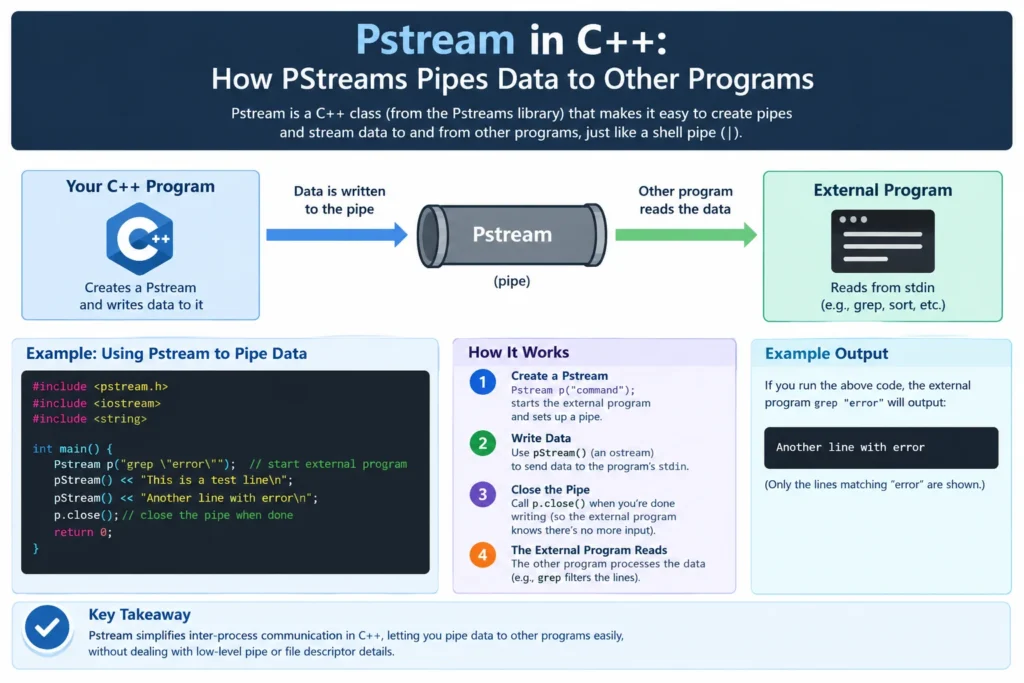
You need your C++ program to run sort or feed it some text and read what comes back. The old C way is popen(), and it gets awkward fast. Pstream offers a friendlier route.
Here’s what you’ll learn: what the library does, how to read and write to a child process, how to catch error output, and the mistakes that trip people up.
What Is the Pstream Library?
The library’s proper name is PStreams, though most people search for “pstream” because that’s the header file. It lets a C++ application launch another program and exchange data with it, much like a shell pipeline. In the simplest case, it works as a C++ wrapper around the POSIX functions popen and pclose, using iostreams in place of C’s stdio.
The classes follow the standard iostream pattern, so if you’ve used std::cin it, the syntax will feel familiar. It’s free software under the Boost Software License 1.0, and the header is really all you need.
It’s POSIX only. Windows users without a POSIX layer are out of luck.
Why Not Just Use popen()?
Fair question. popen() works. But it has gaps.
Behavior differs between systems: some give you two-way pipes, others don’t. Pstream sidesteps this. Because it reimplements the process launching at a lower level, bidirectional I/O works on every supported system. You also get more control. Input streams can read the child’s stderr as well as its stdout, and the buffer class can signal the child process or check whether it has finished, which pclose() can’t be done.
Getting Started
Grab it pstream.h from the project page or install your distro’s package. Debian ships it as pstreams. Then include the header and link nothing extra, since it’s header-only.
cpp
#include <pstream.h>
#include <iostream>
#include <string>
Everything lives in the redi namespace.
Reading Output From a Command
Start with the easy case. ipstream runs a command and lets you read its output line by line.
cpp
redi::ipstream in("ls -l");
std::string line;
while (std::getline(in, line))
    std::cout << line << '\n';
That’s it. No FILE*, no manual buffers. When the loop ends, the child has closed its output.
Want to skip the shell and pass arguments directly? Give the constructor a program name plus a vector of strings, the same idea as execv(). It’s safer when arguments contain spaces or user input, because nothing gets parsed by a shell.
Writing Input to a Command
opstream goes the other way. You write; the child reads.
cpp
redi::opstream out("sort");
out << "pear\napple\nbanana\n";
out.close();
Closing signals the end of input, so it sort knows it can finish.
Talking in Both Directions
Plain pstream handles input and output together. It’s the one I’d reach for when a program needs data fed in and results read back.
cpp
redi::pstream proc("sort");
proc << "pear\napple\nbanana\n" << redi::peof;

std::string word;
while (proc >> word)
    std::cout << word << '\n';
The redi::peof manipulator closes the write side while leaving the read side open. Skip it and you’ll hang. Most programs wait for end-of-input before they print anything, so your loop blocks forever.
Honestly, that’s the number one beginner bug.
Catching Error Output
Say you’re running a command that might fail. Open the stream with both modes:
cpp
redi::ipstream in("ls /nope",
    redi::pstreams::pstdout | redi::pstreams::pstderr);
std::string line;
while (std::getline(in.out(), line)) std::cout << "OUT: " << line << '\n';
in.clear();
while (std::getline(in.err(), line)) std::cout << "ERR: " << line << '\n';
The out() and err() calls pick which of the child’s two channels you’re reading. Drain one, then the other. For chatty programs that write a lot to both, reading them one after another can stall, so keep an eye on output volume.
Checking the Exit Status
Did the command succeed? Since the 1.0 release, it close() returns the child’s exit status.
cpp
int rc = in.close();
if (rc != 0) std::cerr << "command failed: " << rc << '\n';
Earlier versions made you dig the status out of the stream buffer, so check which version your system ships. The 1.0 series also added move semantics, which lets you return streams from functions.
Common Mistakes
Forgetting end-of-input. Covered above. Use redi::peof or close().
Trusting user input in a command string. A shell string-like "grep " + userText invites injection. Use the argument-vector form instead.
Reading before checking failure. A bad command name can be set failbit on the stream. Test the stream state after construction.
Assuming it’s portable. Code that relies on POSIX process calls won’t build natively on Windows.
Ignoring zombie processes. Close the stream and collect the exit status so the child doesn’t linger.
FAQ: Pstream- Related Questions
Q: Is Pstream the same as PStreams?
A: The library is called PStreams, and the header file is pstream.h, so people use both names.
Q: Does Pstream work on Windows?
A: Not natively. It depends on POSIX process functions, so you’d need a POSIX layer such as WSL or Cygwin.
Q: Is Pstream free for commercial use?
A: The project page lists it under the Boost Software License 1.0, which permits commercial use. Check the license text in the version you download.
Q: Can I read stdout and stderr separately?
A: Yes. Open the stream with both modes and switch between out() them.
Q: When should I use plain open() instead?
A: For a one-line, one-directional call in a C-style codebase, it popen() is fine. Reach for PStreams when you need two-way I/O, stderr or exit codes.








1 thought on “Pstream in C++: How PStreams Pipes Data to Other Programs”