
Pipedrive Business Card Scanner: Built-In Tool vs. Third-Party Apps
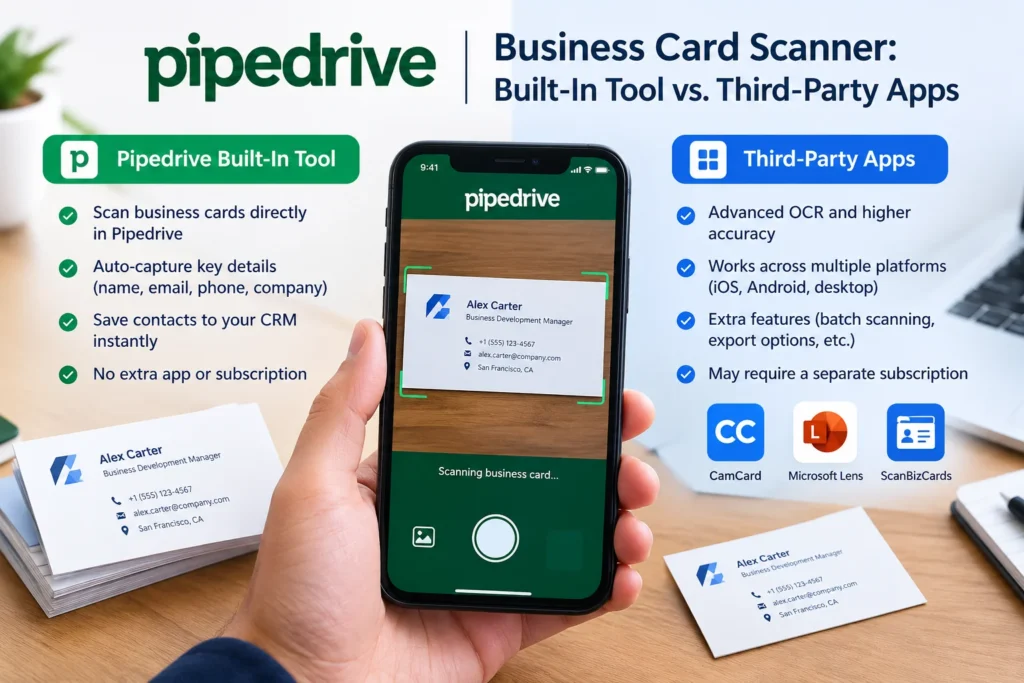
If you’re collecting contacts at events and typing them into Pipedrive by hand, you’ve probably wondered whether there’s a scanner built in. Short answer: yes, but only partly. Pipedrive’s Business Card Scanner is available to all users regardless of plan, and it’s built to simplify contact management and cut out manual data entry. The catch is platform support and scale, which is where a lot of teams end up looking at third-party apps instead.
Here’s what’s actually built in, where it runs out of road, and which outside apps are worth considering depending on how you work.
What Pipedrive’s Built-In Scanner Actually Does
The native scanner lives inside the Pipedrive mobile app. You scan business cards and create contacts directly from the app itself, no separate download required. To use it, you tap the main “+” button, then “Contact scanner,” and point your camera at the card.
A few things worth knowing before you rely on it:
- The scanner can recognize multiple phone numbers or email addresses on a single card, so it’s not limited to one field per type.
- You’re asked to review and confirm the scanned information before it saves to Pipedrive, which catches OCR mistakes before they land in your CRM.
- Only one contact can be scanned at a time, and the card image itself gets saved to the contact’s timeline so you have a visual record later.
- Once scanned, information gets instantly organized into a new contact, and you can import individuals or organizations straight into your leads list.
That’s genuinely useful for someone scanning a handful of cards after a coffee meeting. It’s less useful the moment you’re back from a three-day trade show with eighty cards in a rubber band.
Where the Native Scanner Falls Short
Two limitations come up constantly in Pipedrive’s own community forum. First, platform support: the feature launched on Android, and users on iOS have been asking for parity for a while, with Pipedrive staff pointing them toward marketplace apps instead. One admin response directly told a user that third-party apps on the marketplace introduce the ability to scan physical business cards, among other capabilities, which is effectively Pipedrive acknowledging the gap.
Second, it’s one card at a time with no event tagging, no bulk import, and no data enrichment. Fine for casual use. Not built for someone standing at a booth all day.
Best Third-Party Business Card Scanner Apps for Pipedrive
If you need iOS support, bulk scanning, or lead enrichment, here’s what’s actually on the market right now.
MagneticOne Business Card Reader for Pipedrive. This is the longest-running dedicated option and works on both iOS and Android. You snap a photo, and it exports card data directly into Pipedrive, using OCR to convert names, titles, and contact details. It also creates a custom field for notes since Pipedrive doesn’t have a native description field, which is a small but useful workaround. It’s a solid, no-frills option if you just want cards turned into contacts without extra bells on.
Lead2Pipe. Newer to the space and built with events specifically in mind. It auto-detects card edges, uses OCR to pull names, emails, phones, and companies, and also reads QR codes in vCard and MECARD formats, so it handles digital business cards and LinkedIn QR codes too. It has a dedicated event mode that tags all scans from a conference to that event and tracks scanning stats, plus duplicate detection and offline scanning that syncs once you’re back online. Of the options here, this one is closest to being built for exactly the “I just came back from a trade show” problem.
Spreadly. Positioned as a broader lead-capture platform rather than a pure scanner. It scans paper cards, event badges, and QR codes from digital business card platforms, then syncs contacts to Pipedrive in real time, with OCR that works across more than 25 languages. It leans into team features: shared contact databases, tagging conventions, and analytics on scan volume by event. Worth a look if you want reporting on top of the scan itself, though it’s a heavier tool than most solo users need.
LeadPix. A simpler, CSV-first workflow. You scan cards with your phone, the app enriches each contact with company and title info, and you export one mapped CSV per event that imports straight into Pipedrive’s fields. There’s no live native push yet, so it’s a step more manual than the others, but at a flat monthly rate it’s an affordable middle ground for occasional event scanning.
Tapni. Built around digital business cards first, paper scanning second. It automatically sends new leads from Tapni to Pipedrive, combining smart digital card exchange with an AI paper card scanner. Makes sense if your team already uses NFC or QR-based digital cards and wants paper cards folded into the same system rather than a separate app.
Quick comparison
| App | Platforms | Best for | Notable limitation |
|---|---|---|---|
| Pipedrive native | Android only | Occasional, single-card scans | No iOS, no bulk mode |
| MagneticOne | iOS + Android | Simple, reliable OCR-to-contact | No event or enrichment features |
| Lead2Pipe | iOS | Trade shows, QR + paper together | iOS-focused, newer app |
| Spreadly | iOS + Android | Teams wanting scan analytics | More setup than a basic scanner needs |
| LeadPix | iOS + Android | Occasional events on a budget | CSV import, not live sync |
| Tapni | iOS + Android | Mixed digital and paper card teams | Digital-card-first design |
How to Connect a Scanner App to Pipedrive
Setup is broadly similar across the third-party options:
- Install the app from the App Store or Google Play.
- Open its CRM or integration settings and select Pipedrive.
- You’ll be redirected to Pipedrive’s login to authorize access. This is an OAuth connection, so the app never sees your password.
- Map scanned fields (name, email, company) to your Pipedrive contact fields, adjusting any custom fields your team uses.
- Scan a test card and confirm it lands correctly before relying on it at your next event.
Most of this takes under ten minutes the first time.
Which One Actually Fits Your Situation
If you’re on Android and only scan a card here and there, the native scanner covers it. No install, no subscription, done.
If you’re on iOS or need more than one card at a time, MagneticOne is the straightforward pick for pure scan-to-contact. If you’re specifically prepping for a conference or trade show and want event tagging plus duplicate detection, Lead2Pipe or Spreadly are built with that scenario in mind. If your team already mixes digital and paper cards, Tapni avoids running two separate tools.
Why the Turnaround Time Actually Matters
It’s tempting to treat scanning as a nice-to-have convenience, but the timing behind it has real weight. Older, widely cited research from Harvard Business Review found that firms attempting to contact a lead within an hour were about seven times more likely to qualify it than those waiting even 60 minutes. A separate, vendor-funded study on the same topic put the effect at roughly a 21-times better qualification rate for contact within five minutes versus thirty. The exact multiplier gets repeated inconsistently across blogs, so treat it as directional rather than gospel, but the pattern holds up: a card sitting in your bag until you’re back at your desk is a lead cooling off in real time. A scanner that gets the contact into Pipedrive on the spot, even if it’s “just” convenience on paper, is really a speed-to-follow-up tool.







1 thought on “Pipedrive Business Card Scanner: Built-In Tool vs. Third-Party Apps”