
How to Use Ahrefs’ Free Instagram Caption Generator
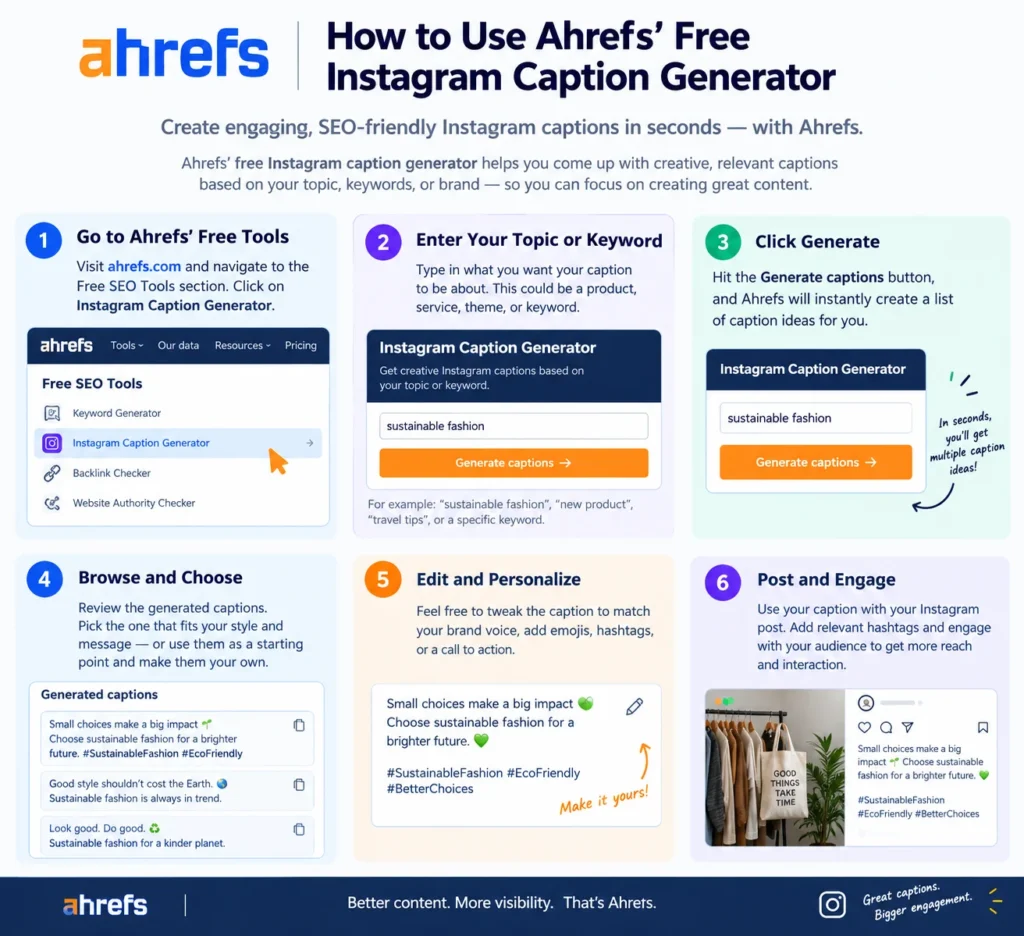
Your photo is edited, your coffee’s cold, and the caption box is still empty. Most of us have been there. The Ahrefs Instagram caption generator is built for that exact moment: a free tool that turns a topic into several draft options in seconds.
Drafts aren’t finished posts, though. Below you’ll see how to run the tool, what to fix afterward, and where it falls short.
What the tool actually is
Ahrefs’ generator is a free AI writing helper, one of a set that also handles hashtags, bios, and usernames. Per Ahrefs’ own tool page, it relies on a language model trained on large text collections, which lets it produce human-sounding copy from whatever prompt you give it. The page names influencers, marketers, and brands as its target users.
How to use it, step by step
- Describe the post. Open the tool and enter a topic or an image if the interface offers upload. Specific beats are vague. “First sourdough loaf, collapsed in the middle, still delicious” gives it far more to work with than “bread.”
- Choose a tone. Third-party reviews mention a range of tones and a choice of one, three, or five variations. Ahrefs can change options anytime, so trust what’s on your screen.
- Generate, then read everything. Skim the whole batch before picking. The best opener is often buried in option four.
- Borrow, don’t paste. Take the strongest line and rewrite the rest in your own voice.
Edit the draft before you post.
Instagram allows 2,200 characters per caption, yet only the first 125 show before the “more” link, according to Sendible’s character limit guide. So your opening line carries the weight. Generated drafts often burn that space on a warm-up. Cut it.
Three quick fixes:
- Lead with a hook, a number, or a question.
- Break the text into short lines so it scans on a phone.
- Keep one call to action, not four.
Hashtags come last. Sendible suggests keeping them short, specific, and readable, which beats a pile of generic tags.
Where it falls short
The Ahrefs Instagram caption generator doesn’t know your audience. It can’t see which past posts earned saves, and it has no idea your followers hate emojis. Output also trends generically, so two brands typing similar prompts can end up with near-identical copy. That’s the real risk.
Honestly? I’d treat it as a brainstorming partner, not a ghostwriter.
Mistakes that make drafts sound robotic
- Posting the first option untouched
- Feeding it a one-word topic
- Ignoring brand voice, so your feed reads like everyone else’s
- Skipping the 125-character check
FAQ
Is the Ahrefs Instagram caption generator free?
Ahrefs presents it as a free tool on its writing tools page. Its paid products are priced separately.
Can it write captions from a photo?
Third-party reviews say it can. Check the current interface, since features change.
How long should my caption be?
The cap is 2,200 characters, but your hook has to fit in the first 125.
Do I need to edit the output?
Yes. Edit for voice, a stronger first line, and one clear call to action.
What are the alternatives?
Roundups list Pallyy, Planable, Hootsuite, and Flockler, among others.







1 thought on “How to Use Ahrefs’ Free Instagram Caption Generator”