How to Run an Illinois Secretary of State Corporation Search
Before you sign a contract, wire a deposit, or hire a vendor in Illinois, there’s a two-minute check that can save you from a costly mistake: the Illinois Secretary of State corporation search. It tells you whether the company you’re dealing with is actually registered and still active and who’s legally responsible if something goes wrong.
This guide walks through exactly how to use the tool, what the results mean, and which red flags should make you pause before doing business with a company.
What the IL Sec of State Corp Search Actually Shows You
The Illinois Secretary of State’s Business Entity Search (sometimes still called the Corporation/LLC Search) is a free public database maintained by the Department of Business Services. It covers corporations, LLCs, not-for-profits, limited partnerships, and limited liability partnerships registered in Illinois.
Run a search,, and you’ll pull up:
- Entity status – Active, dissolved, revoked, or involuntarily dissolved
- File number: The state’s unique ID for that business
- Formation or admission date: When the entity first registered
- Registered agent and office: The legal contact for lawsuits and official notices
- Entity type – corporation, LLC, LP, LLP, or nonprofit
- Annual report standing: Whether the business is current on its filings
That last point matters more than most people realize. An LLC that hasn’t filed its annual report can lose good standing, which is often the first sign a company is winding down or being run carelessly.
I’ve used this search before signing on a contractor who turned out to have a dissolved LLC from three years earlier, still invoicing under the old name. A 90-second lookup would have flagged it immediately.
Step-by-Step: Running the Search
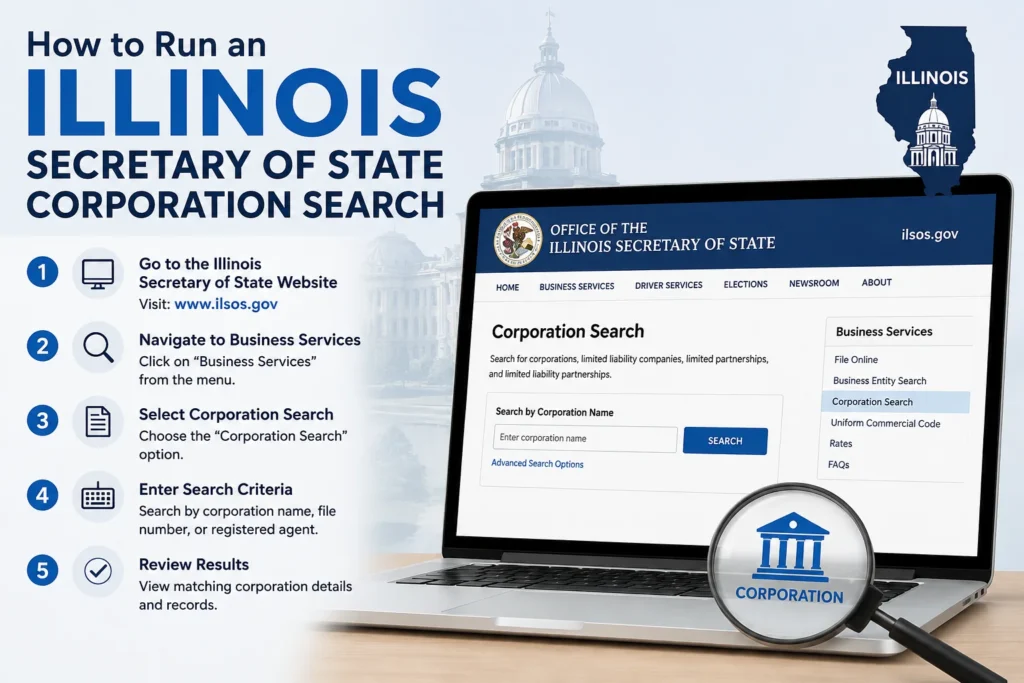
- Go to the official portal. The current tool lives at apps.ilsos.gov/businessentitysearch. The old Cyberdrive Illinois site was retired, so ignore any bookmarks pointing there.
- Pick a search method. You can search by name, keyword, registered agent, file number, or officer/manager name.
- Type carefully. Drop designators like “LLC” or “Inc.” and skip punctuation. The database is strict about exact matches, so a stray comma or extra space can return zero results even when the business exists.
- Review the results list. You’ll see entity type, file number, and name for every match, including dissolved and merged entities.
- Open the file detail report. Click the entity name to see the full status, registered agent, and filing history.
If a name search comes up empty, try a keyword search instead. Keyword searches catch entities where your term appears anywhere in the name, not just at the start, which helps when a company operates under a slightly different legal name than its brand.
Reading the Results Without Getting Confused
Active vs. Good Standing: These aren’t the same thing. “Active” just means the entity exists in the database. “Good Standing” means it’s also current on annual reports and fees. A business can be active but not in good standing, which is worth noticing before you rely on it.
Dissolved vs. Revoked: Dissolved usually means the owners voluntarily closed the entity. Revoked (sometimes called “involuntarily dissolved”) means the state shut it down, typically for missing annual reports or unpaid fees. Either way, a dissolved or revoked entity generally can’t legally operate under that name anymore.
Registered agent address: This is where legal papers get delivered. A P.O. box, an out-of-state address, or a registered agent that’s changed three times in two years are all worth a second look, not necessarily a dealbreaker, but a prompt to ask more questions.
When You Need Proof, Not Just a Screenshot
If a bank, landlord, or licensing board needs official confirmation, a printed search result won’t cut it. You’ll need a Certificate of Good Standing, ordered directly through the same database for $25 for corporations and LLCs, or $5 for not-for-profits. It’s the only document the state will authenticate.
Common Problems and Quick Fixes
- “No results found” for a business you know exists: Try the file number instead of the name, or search a partial word.
- Just filed and can’t find it: New filings usually take 24 to 72 hours to appear in the system.
- Name has special characters or an ampersand: Strip them out and search the plain text version.
- Still stuck: Call the Illinois Secretary of State Business Services department directly at (217) 782-6961.