
How to Do a North Carolina Business Entity Search
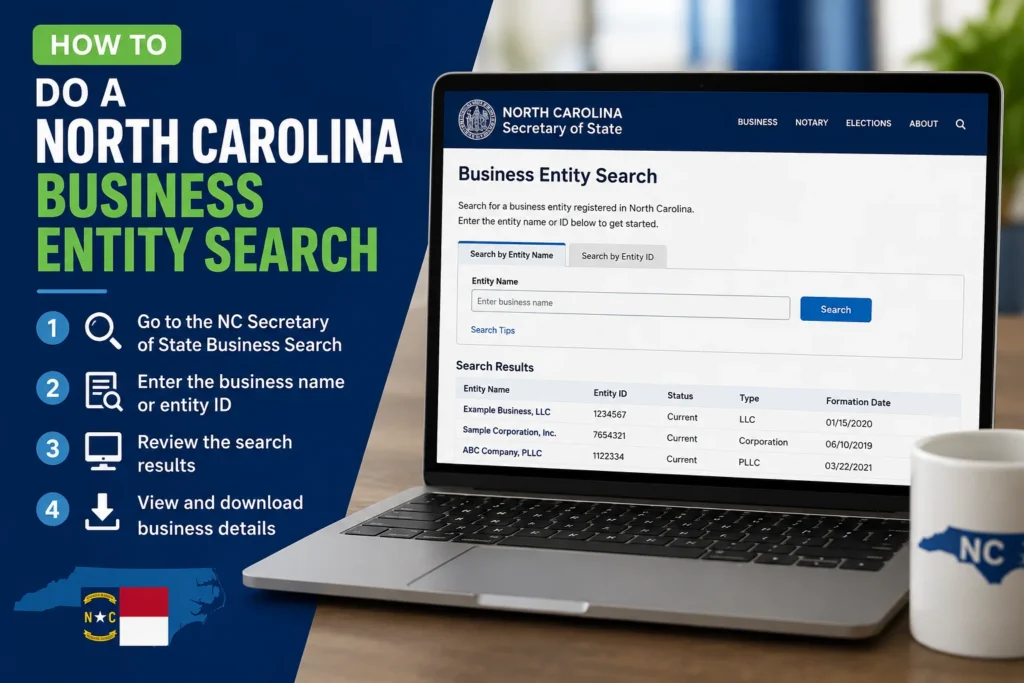
If you’re about to sign a contract, register an LLC, or just check whether a company you’re dealing with actually exists, a North Carolina business entity search is where you start. It’s free, it takes about two minutes once you know where to click, and it can save you from a genuinely bad decision, like paying a deposit to a company that dissolved three years ago.
I’ve run this search more times than I can count, both for my own filings and while vetting vendors. The tool itself is simple. The confusing part is knowing which search option to pick and what the results actually mean. That’s what this guide covers.
What is the North Carolina Business Entity Search? Actually Is
The North Carolina Secretary of State’s office runs a public database of every corporation, LLC, partnership, and nonprofit registered in the state. You can search it by name, by ID number, by registered agent, or by company official. No login, no fee, no waiting period.
The tool lives at sosnc.gov, under Online Services. Everything you need is right there: business status, formation date, registered agent info, and a link to order copies of filed documents if you need them for a loan application or due diligence file.
One thing worth knowing upfront: this database only covers entities that filed with North Carolina. Sole proprietorships and general partnerships operating under an owner’s legal name usually won’t show up unless they’ve registered an assumed name, also called a DBA.
Step-by-Step: Running the Search
Here’s the actual process, start to finish.
1. Go to the official site. Type sosnc.gov directly into your browser rather than clicking a search ad. I’ve seen a handful of lookalike sites charge for information that’s free on the real one.
2. Open Online Services, then Business Registration. From there, click “Search for a Business Entity.” This drops you into the search form.
3. Pick your search type. You’ve got five main options:
- Entity Name: Search by the company’s registered name
- Assumed Name (DBA): Search trade names filed separately from the legal entity
- SOSID: Search by the unique ID number North Carolina assigns to every entity
- Registered Agent: Find every business tied to a specific agent
- Company Official: Find businesses connected to a specific officer or director
4. Choose how loosely you want to match. The form gives you Exact, Starts With, and Contains All Words. Skip Exact unless you’re certain of the full legal name down to the punctuation. North Carolina is what’s called a “distinguishable upon the records” state, meaning two names can differ by something as small as a comma or an “LLC” versus “L.L.C.” Starts With or Contains All Words will catch far more of what you’re actually looking for.
5. Review your results. You’ll see a list with the entity name, SOSID, type, status, and the date it was formed. Click any row to open the full record.
6. Read the detail page. This is where you’ll find the registered agent’s name and address, the principal office address, filing history, and whether the entity is current-active, administratively dissolved, or withdrawn.
What Each Piece of the Record Tells You
A results page throws a lot of information at you at once, so here’s what actually matters depending on why you’re searching.
Checking name availability before you file? Focus on whether anything similar already exists, not just an exact match. If “Blue Ridge Consulting LLC” is taken, “Blue Ridge Consulting Group LLC” might still get rejected for being too close.
Vetting a vendor or business partner? Status is everything. Active and in good standing means the company filed its required reports. “Administratively dissolved” usually means they missed an annual report deadline, which is a red flag worth asking about before you sign anything.
Doing due diligence on an investment or acquisition? Pull the formation date and filing history. A company that’s changed its registered agent three times in two years, or that was dissolved and reinstated, has a story worth hearing directly from them.
Trying to serve legal papers? The registered agent field is your answer. Every entity registered in North Carolina has to keep one on file, and that’s the name and address process servers use.
Common Mistakes People Make
I’ve made a couple of these myself early on, so consider this the shortcut version.
Searching the exact legal name and getting zero results, then assuming the company doesn’t exist. Nine times out of ten, it’s a punctuation or abbreviation mismatch. Switch to “Contains All Words” and try again.
Confusing a similar-sounding out-of-state company for the North Carolina one you meant to check. If a business operates in multiple states, always confirm the SOSID matches the specific entity you’re dealing with, not just the name.
Assuming “Active” means everything’s fine. Active just means the entity hasn’t been dissolved. It doesn’t tell you about lawsuits, debts, or whether the business is actually operating. For anything higher-stakes than a quick name check, that record is a starting point, not the whole picture.
Trying to automate or script repeated searches. The Secretary of State’s own guidance says the portal is built for real-time, one-off lookups, not bulk scraping. If you need a large volume of records, there’s a separate data subscription service for that.
When You Need More Than a Name Check
A basic search tells you an entity exists and is in good standing. It won’t show you liens, UCC filings, tax debts, or pending litigation. If you’re about to make a real investment, whether that’s buying into a company, signing a long lease, or extending significant credit, pair the entity search with a UCC lien search and, depending on the size of the deal, a conversation with an attorney. The two-minute free search is your first filter, not your last one.








1 thought on “How to Do a North Carolina Business Entity Search”