
How to Do a Pennsylvania Business Entity Search
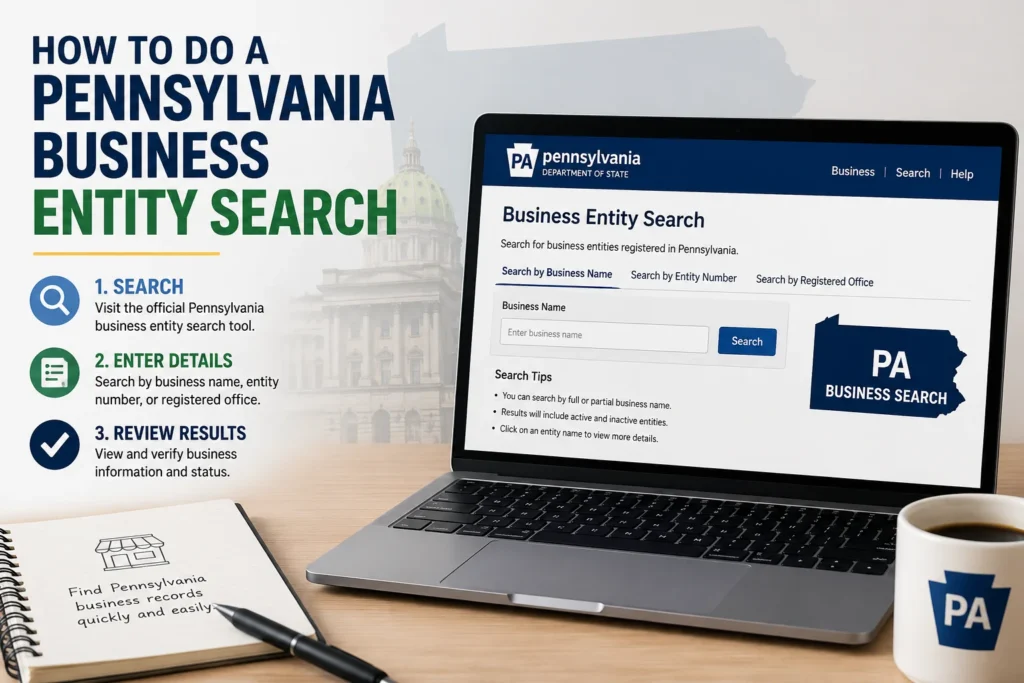
So you need to check on a business in Pennsylvania. Maybe you’re about to file an LLC and want to make sure the name’s not taken. Maybe a vendor claims they’re a registered company, and you want proof. Either way, the tool you need is free, public, and takes about two minutes to use once you know where to look.
Here’s the short version: the Pennsylvania business entity search runs through the state’s PENN File system, and it’s the only place to get an official answer on a company’s legal status.
What Is a PA Business Entity Search?
A PA business entity search is a free lookup tool maintained by the Pennsylvania Department of State (DOS). It covers every corporation, LLC, limited partnership, and other registered entity in the Commonwealth, with over 3 million records in total. The tool lives at file.dos.pa.gov/search/business and is operated by the Bureau of Corporations and Charitable Organizations.
People typically run this search for one of four reasons:
- Checking name availability before filing a new business
- Verifying status of a company (active, dissolved, or behind on filings)
- Doing due diligence on a vendor, partner, or acquisition target
- Confirming their own filings are current
One thing worth knowing upfront: the database only searches by entity name or entity number. You can’t search by an owner’s name, a tax ID, or a business address. If you only know who runs a company, not what it’s legally named, you’ll need another route to track it down.
[BODY IMAGE PROMPT 1] Create an infographic showing “4 Reasons People Search PA Business Records,” four icons in a horizontal row: a magnifying glass over a name tag (name availability), a checkmark shield (status check), a handshake with a document (due diligence), a calendar with a checkmark (compliance confirmation), flat design, a blue and warm gray color palette, clean sans-serif labels under each icon, white background, 1200x500px, vector illustration style.
Step-by-Step: How to Search the Database
Running the search itself is straightforward. Here’s the exact process:
- Go to file.dos.pa.gov/search/business. This is the official portal; bookmark it, since third-party sites sometimes charge for what’s actually a free government tool.
- Type in a business name and hit search. A partial name works fine if you’re not sure of the exact spelling.
- Open Advanced Search if you need filters. You can narrow by whether the name “contains” or “starts with” your search term, plus filing type, status, and filing date range.
- Click a result to open the full record. This is where you’ll find the entity number, filing history, registered office address, and any documents on file.
If nothing comes up, don’t assume the name is free and clear just yet. Try dropping designators like “LLC” or “Inc.,” test a few spelling variations, and check for close matches. Pennsylvania requires new names to be clearly distinguishable from existing ones, so a near-match can still cause a rejection later.
What Shows Up in Your Search Results
Each result row gives you a snapshot: the entity’s legal name, filing type, the date it was first registered, its current status, entity type, home jurisdiction, and address. Click through to the full record, and you’ll also see the entity number and complete filing history.
| Field | What It Tells You |
|---|---|
| Entity name | The registered legal name on file |
| Status | Active/subsistence, dissolved, or administratively terminated |
| Entity type | LLC, corporation, LP, LLP, and so on |
| Filing date | When the business first registered with the state |
| Jurisdiction | Whether it was formed in PA or registered as a foreign entity |
| Address | Registered office or Commercial Registered Office Provider (CROP) |
A status of “subsistence” is Pennsylvania’s version of “active” or “in good standing.” It means the entity legally exists and is current on its required filings. A “dissolved” status means the legal existence has ended, either voluntarily or because the state stepped in.
Why This Search Actually Matters
It’s easy to treat this as a box-checking step, but skipping it creates real risk. Filing a business name that’s already taken (or close enough to cause a rejection) wastes your filing fee and delays your launch. Signing a contract with a company that’s been administratively dissolved can leave you without legal recourse if something goes wrong. And if you’re the one running the business, an outdated registered office address means you might miss a legal notice you’re required by law to respond to.
There’s also a newer wrinkle worth knowing about. Pennsylvania replaced its old ten-year reporting cycle with an annual report requirement starting in 2025, under Act 122 of 2022. For-profit entities pay $7 a year; nonprofits pay nothing. The state gave businesses a grace period through 2026, but starting with reports due in 2027, a missed filing can trigger administrative dissolution and the loss of your name protection. Checking your own entity’s status periodically isn’t just good practice anymore; it’s how you catch a lapse before it becomes a bigger problem.
Common Mistakes People Make With This Search
A few patterns show up again and again:
- Searching only the brand name, not the legal name. Plenty of Pennsylvania businesses operate under a fictitious name (a DBA) that’s different from what’s registered with the state. If the brand name you’re searching doesn’t appear, try the owner’s likely legal entity name instead.
- Assuming “no results” means the name is free. As mentioned above, near-matches and spelling variants can still block a filing. Test a few versions before you commit.
- Skipping the detail page. The summary row doesn’t show everything. Always click into the full record if you’re making a decision based on what you find, especially for due diligence.
- Treating this as proof of good standing for a bank or lender. For anything official, like opening an account or securing financing, you’ll typically need a Certificate of Subsistence (Pennsylvania’s equivalent of a Certificate of Good Standing), not just a screenshot of the search results.
[BODY IMAGE PROMPT 2] Create a simple before-and-after style diagram: left panel titled “What the Search Shows You” with a mock browser window listing name, status, filing date, and entity type; right panel titled “What You Might Still Need” with icons for a certified document, a magnifying glass, and a calendar reminder, connecting arrow between panels, flat design, muted blue and orange accents, clean modern typography, white background, 1200x550px.
A Few Advanced Tips
If you’re doing due diligence on a company rather than just checking your own filing, go a step further than the entity search. Cross-reference the business with the Pennsylvania court system for any litigation history, and check the Department of Revenue separately for tax registration status, since entity status and tax standing aren’t the same thing. For anything with real money on the line, like a contract over $20,000 or a financing decision, request a certified copy of the filing directly from the DOS rather than relying on the free search alone.
If you’re comparing entity options across states, such as forming in Delaware and then registering to do business in Pennsylvania as a foreign entity, run the same kind of search in both states before you file anything.








1 thought on “How to Do a Pennsylvania Business Entity Search”