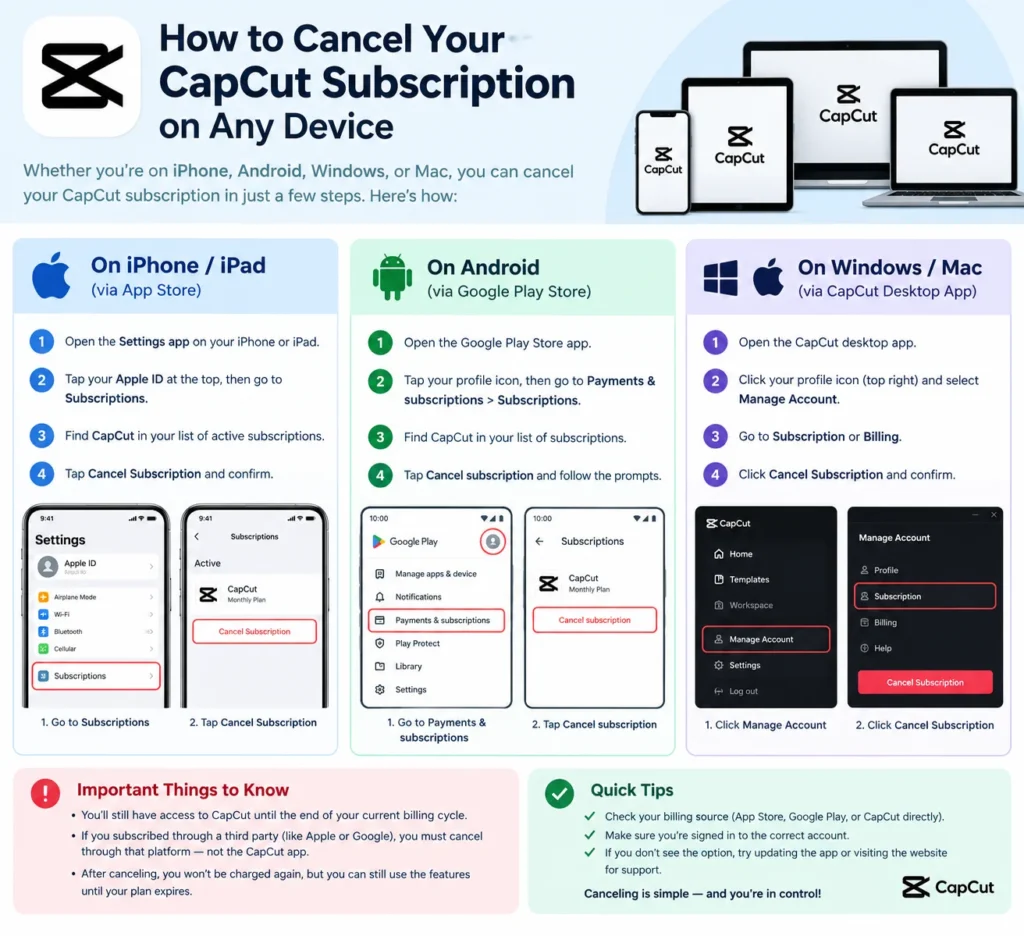
How to Cancel Your CapCut Subscription on Any Device
Deleted the app, and the charge still showed up? You’re not alone. Deleting the app does not cancel the subscription, so billing carries on until you switch it off properly.
Where you switch it off depends on where you paid. Whichever channel took your money is the one that can stop it: Apple Subscriptions for iOS, Google Play subscriptions for Android, or your CapCut account billing page for web and PC. Cancel in one spot and a plan bought somewhere else keeps billing you.
Quick version: find CapCut in the store or account that bills you, turn off auto-renewal, and do it a day or so before the renewal date.
First, Work Out Who Bills You
Dig up your receipt. An email from Apple or Google means that store handles the billing. A card statement line naming CapCut usually points to a web or desktop purchase. Check this first, or you’ll waste ten minutes in the wrong menus.
Cancel CapCut on iPhone or iPad.
Apple bills iOS subscriptions, so the cancel button lives in Settings, not inside CapCut.
- Open Settings and tap your name.
- Tap Subscriptions.
- Select CapCut (or CapCut Pro).
- Tap Cancel Subscription and confirm.
Apple stops future renewals, while Pro access continues until the current billing period ends. Apple’s own support page covers the same flow if your menu looks different.
Cancel CapCut on Android
Google Play owns these subscriptions.
- Open the Google Play Store and tap your profile icon.
- Go to Payments & subscriptions, then Subscriptions.
- Tap CapCut.
- Choose Cancel subscription and confirm.
No CapCut in the list? You may be signed in to a different Google account, or the plan may have been bought on the web or on iOS. Switch accounts and look again.
Cancel CapCut on Desktop or Web
Paid on capcut.com or inside the desktop app? Your CapCut account holds the plan.
- Sign in at capcut.com with the account that bought it.
- Click your avatar, top right, then open your current plan.
- Hit Cancel, then confirm Cancel Auto-renewal.
Honestly, labels shift here. CapCut’s help center doesn’t publish an exact menu path, and the wording can read Subscription, Membership or Billing, so follow whichever fits. One trap: a Pro plan bought on iPhone can’t be cancelled from the desktop website.
Not much, at first. Pro features keep working until your paid period runs out, and your projects and videos aren’t deleted. Spend any leftover credits before the cycle ends, because unused perks aren’t refunded.
Refunds are the sore spot. CapCut treats subscriptions as virtual goods, so purchases generally don’t support refunds, though cases like double billing can go through an appeal.
Can’t Cancel? Contact Support
If the button’s missing or greyed out, write to CapCut through the in-app help section. Include screenshots of the charge, your CapCut username, and the email or account ID you used. Screenshot your cancellation confirmation too; I’d do that for any subscription.
FAQ: CapCut Cancel Subscription Questions
Does deleting the app cancel my plan? No. Billing continues until you cancel through Apple, Google, or your CapCut account.
Can I cancel on desktop if I subscribed on my phone? Not usually. Use the platform that billed you.
Will I lose my projects? No. Your edits stay put, and you can keep using the free version.
Can I get a refund? Generally no, except special cases such as double billing.
When should I cancel before renewal? A day ahead is the safe window.