
What Is Serverless Computing? Beginner’s Guide 2026
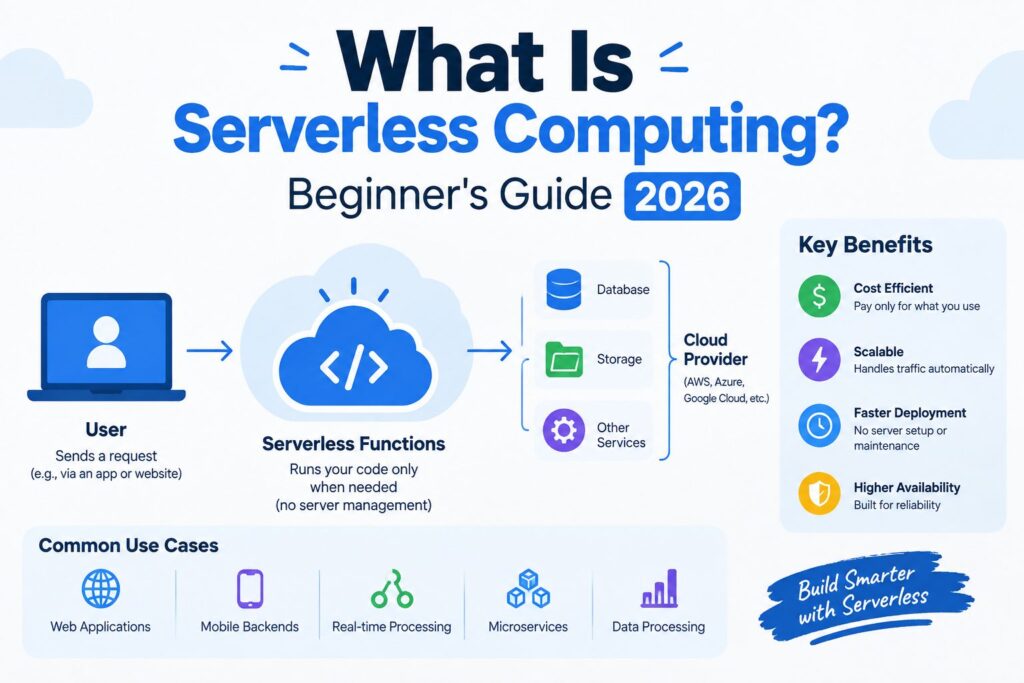
Serverless computing is a cloud model where the provider runs, patches, and scales the servers, and you pay only for the moments your code executes. Servers still exist. You just never see them.
Picture owning a car versus calling a ride. The car costs you insurance and parking every day, even while it sits in the garage. The ride costs nothing until you take a trip. Traditional hosting works like the car. Serverless works like the ride.
This guide covers how the model works, what it costs (with real math from AWS’s published rates), and when you should skip it.
What Is Serverless Computing?
Your code runs on machines owned by a cloud provider such as Amazon Web Services, Microsoft Azure, or Google Cloud. The provider decides where it runs, how many copies to start, and when to shut them down. You upload code and connect it to a trigger. That’s the whole job.
Serverless computing isn’t only about functions, either. The same idea now covers managed databases, file storage, and API gateways that scale up and down on their own and bill by usage.
The idea has been around longer than you might expect. Google App Engine took over server management for web apps in 2008, and AWS Lambda made the function-based version mainstream in 2014. UC Berkeley researchers predicted in 2019 that this model would grow to dominate the future of cloud computing. I’d say the jury is still out on “dominate,” but adoption keeps climbing.
How Does Serverless Computing Work?
Every run follows the same four steps:
- An event arrives: a web request, a file upload, a timer, or a message from another service.
- The platform starts a small, isolated environment and loads your function.
- Your code runs and returns a result.
- The environment shuts down, and the billing meter stops.
Say a customer uploads a profile photo to your app. The upload is the event. A function wakes up, shrinks the photo into a thumbnail, saves it, and disappears. If nobody uploads anything overnight, nothing runs and nothing bills. Engineers call this scaling to zero, and it’s the feature that separates this model from a server you rent by the hour.
That pattern is called Function-as-a-Service (FaaS). Popular versions include AWS Lambda, Azure Functions, and Cloudflare Workers. A sibling idea, Backend-as-a-Service, hands finished pieces like logins and databases to a provider so you can focus on the front end.
Two quirks matter early. First, functions are stateless. Each run starts clean, so anything worth keeping goes into a database or storage service. Second, there’s the cold start: when a function has been idle, the platform needs a moment to wake it, which delays that first request. Providers keep shrinking the delay, but it’s real. I haven’t run my own benchmarks, and published numbers swing so widely by language and setup that I won’t quote one.
Serverless vs. Traditional Hosting
| Serverless | Traditional server | |
|---|---|---|
| Billing | Per request and run time | Per hour, busy or idle |
| Scaling | Automatic, down to zero | Manual or rule-based |
| Maintenance | Provider handles it | You patch and monitor |
| Control | Limited | Full |
Containers and platform-as-a-service sit in the middle. They take away some upkeep, but you still size, scale, and pay for capacity that may sit idle. Serverless goes furthest in handing the work over, and that’s exactly why it gives up the most control.
What Does Serverless Computing Cost?
Most guides say “pay per use” and stop there. Here’s the math instead.
AWS Lambda charges $0.20 per million requests plus $0.0000166667 per GB-second of compute on x86, after a monthly free tier of 1 million requests and 400,000 GB-seconds. Now take a small API: 5 million requests a month, 512 MB of memory, and 200 ms per request.
- Compute: 0.5 GB × 0.2 seconds × 5,000,000 requests = 500,000 GB-seconds. Subtract the free 400,000 and 100,000 are billable, for about $1.67.
- Requests: 4 million billable at $0.20 per million comes to $0.80.
- Total: roughly $2.47 a month.
A third-party pricing calculator lands on the same figure. Notice, too, that at this size the free tier alone covers about 4 million runs before any compute charge appears, which is why side projects and internal tools often cost nothing. Compare that with a server that bills for all 730 or so hours of the month, whether anyone visits or not.
These rates apply to x86 functions, and Arm-based ones run roughly 20% cheaper per GB-second. Prices change, so check your provider’s current rate card before you budget.
Two caveats. The total leaves out API gateways, logging, and data transfer, the line items that tend to surprise teams. And the math flips for steady, heavy traffic: a function that’s busy around the clock can cost more than a reserved server.
Why It Matters More in 2026
AI has changed the math. A function that waits on a slow model call is billed for the waiting, so AI features can quietly inflate a serverless bill. Some providers now offer serverless GPU capacity for heavy jobs, but those carry their own pricing, so read the fine print before assuming the free tier stretches that far.
Benefits of Serverless Computing
- No server upkeep. Patching, capacity planning, and operating system updates belong to the provider.
- Automatic scaling. Ten requests or ten million, the platform adds and removes capacity for you.
- No idle bills. Quiet nights and weekends cost nothing.
- Faster shipping. Small teams launch features without waiting on infrastructure work.
Drawbacks to Know About
Cold starts add delay to rarely used functions. Vendor lock-in is the risk I think teams underrate: each provider’s triggers, permissions, and databases differ, so moving later means rewriting more than code. Debugging is harder because you can’t log into a machine and poke around. Long-running jobs get expensive, and providers cap how long a function may run.
You can soften lock-in by keeping business logic in plain functions and isolating provider-specific glue in a thin layer. Open-source projects like Knative run serverless workloads on any Kubernetes cluster, though you then manage the cluster yourself.
Security stays a shared job, too. The provider secures the platform, but you still own your code, permissions, and data.
When Should You Use Serverless Computing?
Good fits:
- APIs and webhooks with spiky, unpredictable traffic
- Image or file processing triggered by uploads
- Scheduled jobs such as nightly reports
- Chatbots and event-driven automation
Poor fits:
- Steady, high-volume workloads
- Jobs that run for hours, like video rendering
- Apps that need strictly consistent, low latency
- Systems that need custom hardware or operating system control
Here’s a quick test for serverless computing. If your traffic looks like a heartbeat with big gaps, serverless probably saves money. If it looks like a flat line, price a reserved server first.
Common Mistakes
- Storing state inside the function. It disappears after the run.
- Ignoring the supporting services. Logging, gateways, and data transfer can outweigh the function itself.
- Guessing at memory. Memory sets both price and CPU speed, so under-powering a function can cost more, not less. Test a few sizes.







1 thought on “What Is Serverless Computing? Beginner’s Guide 2026”