Free Genogram Maker: Build Your Family Genogram Online
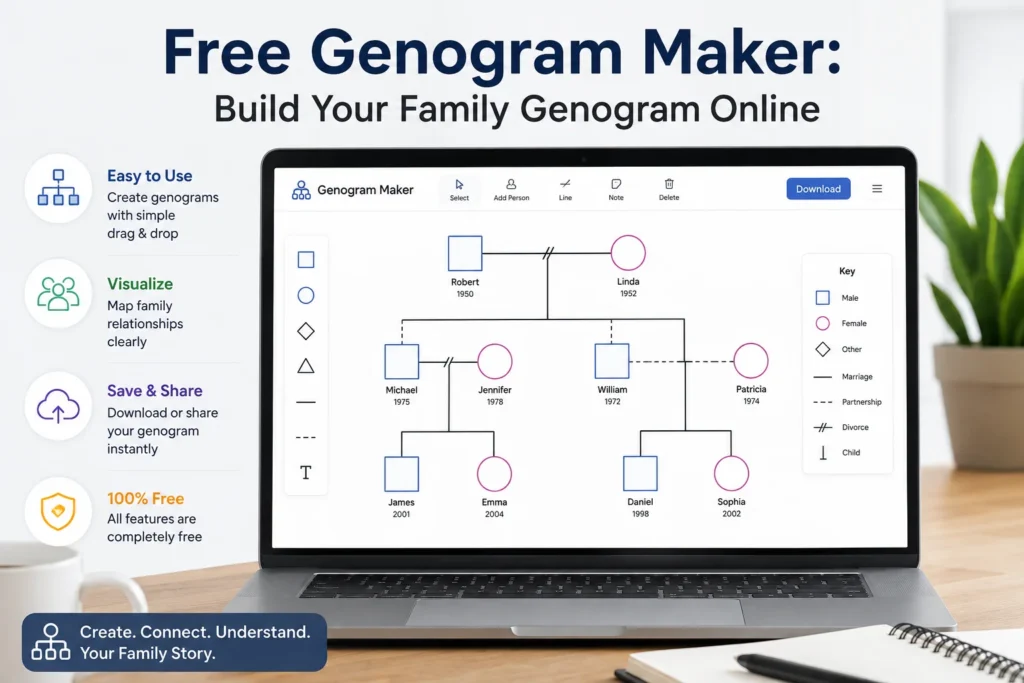
If you’ve ever tried to map out a family’s relationships, health history, or emotional patterns on paper, you already know the problem: it gets messy fast. Squares and circles multiply with every generation, lines cross, and one crowded page turns into three. A genogram maker solves that by handling the layout, symbols, and connections for you, so you can focus on the family story instead of the drawing.
This guide covers what a genogram actually is, who uses one, how to build one online step by step, and what to look for in a genogram maker before you commit to one.
What Is a Genogram?
A genogram is a diagram that maps a family across generations, similar to a family tree but far more detailed. Where a family tree mostly shows who’s related to whom, a genogram adds layers: marriages and divorces, emotional closeness or conflict, medical conditions, and significant life events like adoption or estrangement.
The format was developed in the 1980s by family therapist Monica McGoldrick and psychiatrist Randy Gerson, who wanted a standardized way for clinicians to record and interpret family patterns at a glance. Their notation system, later expanded with contributions from Sueli Petry, is still the reference point most genogram makers build their symbol libraries around today.
Because the notation is standardized, a genogram built by a therapist in one clinic can be read and understood by a colleague anywhere else. That consistency is part of why genograms remain a core tool in family therapy, genetic counseling, and social work.
Genogram vs. Family Tree: What’s the Difference?
People often use these terms interchangeably, but they serve different purposes.
- A family tree answers “who came from whom.” It’s built for genealogy and ancestry research, and it typically shows names, birth years, and lineage.
- A genogram answers, “What’s happening in this family.” It layers in relationship quality, health history, and behavioral patterns on top of the basic family structure.
If you’re researching ancestry, a family tree tool is the better fit. If you’re assessing family dynamics, hereditary health risk, or emotional patterns, a genogram is built for that job.
Who Actually Uses a Genogram Maker?
Genograms show up across several fields, each using them a little differently:
- Therapists and counselors use genograms in intake sessions to spot recurring relationship or behavioral patterns across generations.
- Social workers rely on them to document family structure quickly, especially in cases involving custody, foster care, or crisis intervention.
- Genetic counselors and medical professionals use genograms to trace hereditary conditions and flag risk factors before they become urgent.
- Students in psychology, nursing, and social work programs build genograms as part of coursework to learn family assessment.
- Individuals and families sometimes build a genogram just to better understand their own history, especially around recurring health conditions or family conflict.
The common thread: everyone in this list needs to build genograms accurately and repeatedly, which is exactly where a dedicated maker beats a blank page or a generic drawing app.
[Image Prompt: Split illustration showing four professionals—therapist, social worker, genetic counselor, and student—each with a small genogram icon nearby, flat design, soft color-coded backgrounds, white background, alt text: “professionals who use genogram makers”]
How to Build a Genogram Online, Step by Step
Most genogram makers follow a similar workflow. Here’s how it typically goes:
1. Start with a template or a blank canvas. Templates save time if you’re mapping a standard three-generation family. A blank canvas gives you more control if the family structure is unusual (blended families, multiple marriages, non-biological caregivers).
2. Add the core generation first. Place the primary individual, then add parents, siblings, partners, and children using the tool’s shortcuts. Most modern genogram makers let you add a parent or sibling with a single click or keystroke instead of manually drawing each shape.
3. Apply standard symbols for gender and status. Squares typically represent males, circles represent females, and additional shapes or fill patterns cover non-binary identities, pregnancy, deceased individuals, and more, depending on the notation set the tool supports.
4. Draw the relationship lines. Solid lines usually indicate marriage, dashed lines indicate cohabitation, and jagged or crossed lines represent conflict or estrangement. This is where the emotional and relational layer of a genogram comes through.
5. Add notes and health details. Attach medical history, key dates, or behavioral notes to individual nodes without cluttering the diagram itself. Good genogram makers keep this data in expandable fields rather than forcing it all onto the visible canvas.
6. Export or share. Download the finished genogram as a PDF, PNG, or image file, or share a live link for collaborative editing with colleagues or family members.
Standard Genogram Symbols You’ll See
Every genogram maker builds on roughly the same visual language, based on the McGoldrick-Gerson notation:
| Symbol | Meaning |
|---|---|
| Square | Male |
| Circle | Female |
| Horizontal line between two shapes | Marriage or partnership |
| Dashed horizontal line | Cohabitation or informal relationship |
| Diagonal or double slash through a line | Divorce or separation |
| Vertical line down | Parent-child relationship |
| X through a shape | Deceased individual |
| Jagged connecting line | Conflict |
Some tools extend this further with symbols for adoption, foster care, twins, and cultural or religious identity markers. If your work involves diverse family structures, check that a tool’s symbol library goes beyond the basics before you rely on it.
What to Look for in a Genogram Maker
Not all genogram tools are built the same way. Before choosing one, it’s worth checking for a few specific things:
- Standard notation support. The tool should follow McGoldrick-Gerson conventions so your genograms are readable by other professionals.
- Speed features. Keyboard shortcuts or one-click additions for common relationships (parent, sibling, partner) save real time once you’re building genograms regularly.
- Data privacy. Genograms often contain sensitive medical and personal information, so look for clear privacy practices, especially if you work in a clinical or healthcare setting.
- Export flexibility. PDF and image exports cover most needs, but collaborative sharing links matter if you’re working with a team or co-facilitating sessions.
- Room to grow. A tool that only handles three generations cleanly will struggle once a case gets more complex. Check how the layout holds up with larger, blended, or multi-marriage families.