What Is a Node in Networking?
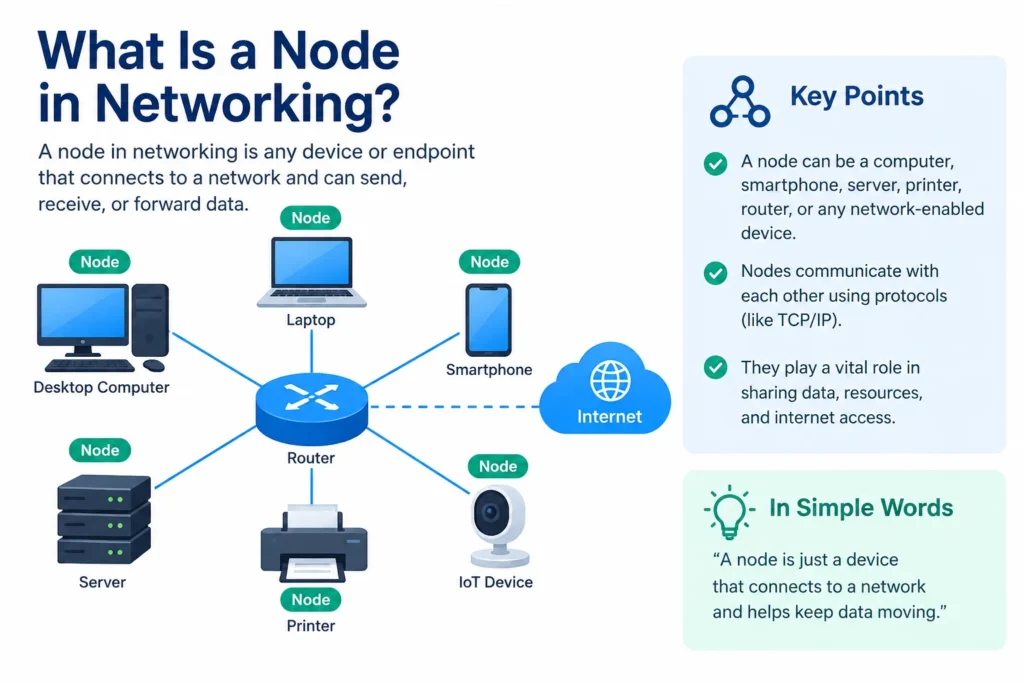
Open any networking textbook or troubleshooting guide, and you’ll run into the word “node” within the first paragraph. It’s one of those terms people nod along to without ever really defining, which is a problem if you’re trying to understand how your home Wi-Fi actually works or debug why a device dropped off the office LAN.
Here’s the short version: a node is any device connected to a network that can send, receive, create, or forward data. Your laptop is a node. So is the router sitting under your desk, the printer down the hall, and the switch in the server closet you’ve probably never opened.
The Basic Definition
A node is a connection point in a network, identified by a unique address, usually an IP address or a MAC address, that lets other devices find and communicate with it. The term comes from the Latin nodus, meaning “knot,” which is a pretty good visual: picture a network as a web of strings, and every place two or more strings meet is a node.
That address matters more than people realize. Without it, a network has no way to know where data should go. When you send a file from your phone to a shared drive, that data gets broken into packets, and each packet gets routed from node to node, hopping through switches and routers, until it lands at its destination. No node, no delivery.
Not every node behaves the same way, though. Some just generate or receive data. Others exist purely to move it along.
Types of Nodes
Networking pros usually split nodes into two broad categories, and it helps to think about which job each one is doing.
End nodes are the devices people actually interact with: computers, smartphones, tablets, printers, IoT sensors, and smart TVs. They originate or terminate communication. When you open a browser and load a webpage, your laptop is acting as an end node requesting data.
Intermediate nodes don’t originate or consume data themselves. Their whole job is passing it along efficiently. This group includes:
- Routers: Direct traffic between different networks, including out to the internet
- Switches: Connect devices within the same local network and forward data to the correct port
- Hubs: Older, simpler devices that broadcast data to every connected device (mostly replaced by switches today)
- Access points: Bridge wireless devices onto a wired network
- Modems: Translate signals between your local network and your internet service provider
There’s a third category worth mentioning: telecommunication nodes, like cellular base stations, which route voice and data across much larger geographic areas than a typical office or home network would ever need to cover.
How Nodes Actually Move Data
Say you’re streaming a video. Here’s roughly what happens at the node level:
- Your laptop (an end node) requests the video file
- That request gets broken into data packets
- Each packet passes through your router, then possibly several more intermediate nodes across the internet
- Every node along the way reads the packet’s address and forwards it toward the next hop
- The packets arrive at the video server, which sends the file back through a similar chain of nodes
This handoff process relies on protocols, most commonly TCP/IP, which give every node a shared language for addressing and forwarding data. Without a common protocol, nodes built by different manufacturers simply couldn’t talk to each other.
It’s worth noting that a single physical device can act as more than one type of node depending on its role. A home Wi-Fi router, for example, usually functions as a router, a switch, and an access point all at once, even though it’s one box sitting on a shelf.
Why Understanding Nodes Matters
If you manage even a small network, thinking in terms of nodes changes how you troubleshoot. A dropped connection, a slow file transfer, or an unreachable printer almost always traces back to a specific node: a switch port that failed, a router that needs a reboot, or a device with a misconfigured IP address.
Larger networks are also measured and planned around nodes. Network administrators track node count, node health, and node redundancy to keep systems running when hardware fails. In a well-designed enterprise network, no single node’s failure should take the whole system down, which is why you’ll often see backup routers or redundant switches built into the design.