What Is a Headless CMS? A Plain-English Guide
If you’ve spent any time researching website platforms lately, you’ve probably run into the term “headless CMS” and wondered what exactly is missing a head. Here’s the short answer: nothing is broken; it’s just a different way of organizing how content gets stored and shown to people.
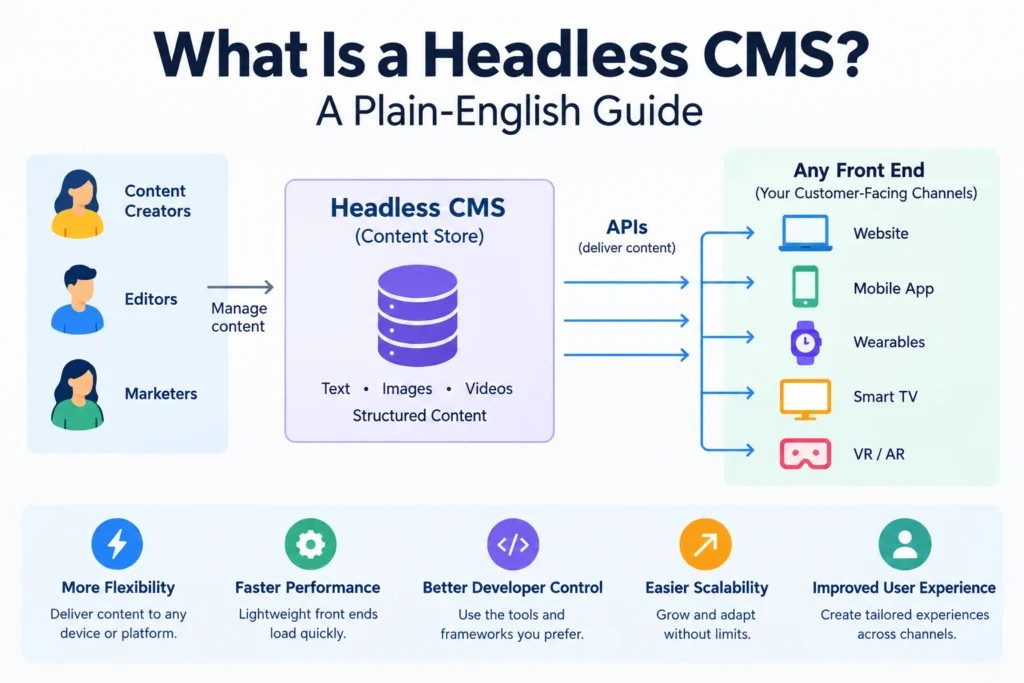
A headless CMS is a content management system that stores your content, articles, product descriptions, images, whatever, and hands it off through an API instead of controlling how it looks on a webpage. There’s no built-in theme, no template engine, no “frontend” bolted on. You write the content once, and then any application, a website, a mobile app, a smart TV, a kiosk in a store, can request that content and display it however it wants.
Think of it like a restaurant kitchen. A traditional CMS is a kitchen attached to one dining room: the food only ever gets served in that one space, arranged that one way. A headless CMS is a kitchen that sends meals out through a pickup window to any dining room, food truck, or catering event that asks for them. The API is that pickup window.
How It’s Different From a Traditional CMS
WordPress is the classic example of a traditional, “coupled” CMS. When you write a post, WordPress stores the content and immediately decides how it’s rendered, using its own theme system, templates, and plugins. Content and presentation live in the same system.
A headless CMS splits those two jobs apart:
- The backend is where your team writes and organizes content, still through a friendly editor interface, not raw code.
- The delivery layer is an API (usually REST or GraphQL) that any application can call to pull that content.
- The frontend is built separately, often in a framework like Next.js, React, or Astro, and it’s entirely up to the developers how that content gets displayed.
Because presentation isn’t baked in, the same piece of content, say, a product description, can appear on your website, inside your mobile app, and on an in-store display screen, all pulled from a single source instead of copied and re-formatted three separate times.
Why Teams Are Adopting Headless CMS
The main draw is flexibility across channels. A few years ago, “publish everywhere” mostly mattered to large enterprises juggling multiple regional websites. Now it’s relevant to much smaller teams too, since content routinely needs to reach a website, an app, a customer portal, and sometimes even an AI assistant or voice interface. Once content has to leave the “one website” model, trying to manage it as static, templated pages starts to break down, and structured, API-delivered content becomes the more practical option.
There’s real commercial momentum behind this shift as well. Market analysts at Future Market Insights project the headless CMS market growing from under a billion dollars to roughly $7.1 billion by 2035, expanding at about a 22.6% annual rate, which tracks with how many mid-size companies have adopted the architecture over the past few years, not just large enterprises with dedicated engineering teams.
Other advantages worth knowing:
- Faster performance. Since content is delivered as lean API data rather than a fully rendered page, frontends built on frameworks like Next.js can load noticeably faster.
- Developer freedom. Engineers aren’t locked into a CMS’s templating language or plugin ecosystem; they can use whatever frontend stack fits the project.
- Content reuse. Write it once, publish it to a website, an app, and a partner’s site without duplicating effort.
- Security. With no public-facing theme or plugin layer to exploit, a headless setup often has a smaller attack surface than a plugin-heavy WordPress install.
The Tradeoffs
None of this comes for free. A headless CMS assumes you have developers who will build and maintain a custom frontend; there’s no “install it and pick a theme” simplicity the way there is with WordPress. Marketing teams that are used to visually editing pages in a WYSIWYG builder often lose that ability, since previewing exactly how content will look requires the frontend to be built first. And because you’re managing two separate systems (the content backend and the custom frontend) instead of one bundled platform, there’s more initial setup and more moving parts to maintain long-term.
For a small business without in-house developers, a traditional CMS or a website builder is usually still the simpler, cheaper choice. Headless architecture tends to pay off once you’re delivering content to more than one channel or need performance and flexibility that a templated CMS can’t offer.
Popular Headless CMS Platforms
If you’re evaluating options, the names that come up most often include Contentful, Sanity, Strapi (open-source), Storyblok, and Sitecore for enterprise use. They vary in pricing model, self-hosted versus fully managed, and how they handle things like content previews and localization, so it’s worth testing two or three against your actual use case before committing.
Frequently Asked Questions
Is a headless CMS the same as a “decoupled” CMS?
Not quite. Decoupled CMS platforms separate the backend and frontend like a headless CMS does, but they still ship a default frontend you can use, whereas a true headless CMS provides no frontend at all.
Do I need to know how to code to use a headless CMS?
Content editors don’t need coding skills to write and manage content in the backend interface. Building and maintaining the frontend that displays that content, though, does require developers.
Can WordPress be used as a headless CMS?
Yes. WordPress has a REST API and GraphQL support (via plugins) that let developers pull its content into a separate frontend, effectively using WordPress as a headless backend while ignoring its built-in themes.
Is a headless CMS better for SEO?
It can be, mainly because custom frontends built with modern frameworks tend to load faster, and page speed is a ranking factor. But SEO also depends heavily on how the frontend is built; a poorly built headless site can rank worse than a well-optimized WordPress site.
What’s the difference between headless and “MACH” architecture?
MACH stands for Microservices, API-first, Cloud-native, and Headless. A headless CMS is one piece of a broader MACH approach, which also includes modular, independently deployable backend services rather than one monolithic platform.