How to Use the NC Secretary of State Business Search
If you need to check whether a North Carolina company is real, active, and in good standing, the state gives you that answer for free. The NC Secretary of State business search is the official public database for every corporation, LLC, partnership, and nonprofit registered in North Carolina, and it takes about thirty seconds to run a basic lookup.
This guide walks through exactly how the tool works, what each search option actually does, what you’ll find in a business record, and where the state’s data stops (so you’re not caught off guard when it doesn’t have what you expected).
What Is the NC Secretary of State Business Search?
The North Carolina Department of the Secretary of State, currently led by Secretary Elaine F. Marshall, maintains the state’s official business registry at sosnc.gov. Every corporation, LLC, limited partnership, and nonprofit that wants to legally operate in North Carolina has to file with this office first, and those filings become public record.
The business search tool lets you pull that record directly. No account, no login, and no fee for a standard lookup. You’ll see whether an entity is active or dissolved, who its registered agent is, when it was formed, and what type of entity it is.
It’s worth being clear about what this database is not. It’s not a credit report, it’s not a lawsuit tracker, and it doesn’t cover sole proprietors or general partnerships that never filed with the state. Keep that limitation in mind as you search, because a business not appearing in results doesn’t always mean it’s illegitimate.
How to Search: Step by Step
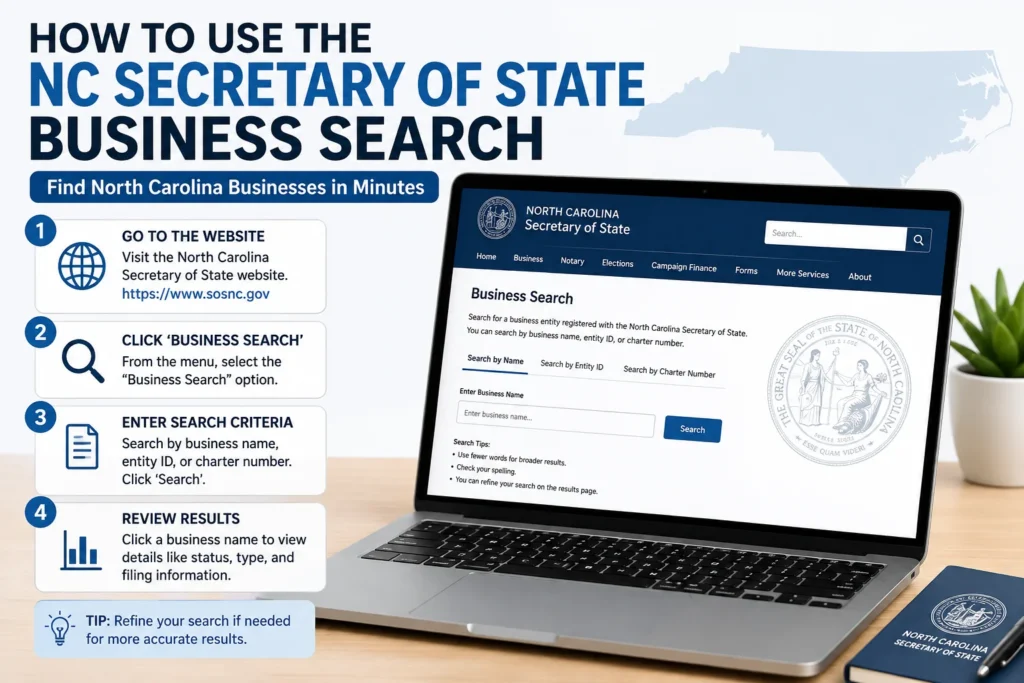
1. Go to the official search page. Navigate to sosnc.gov and find “Search for a Business Entity” under the Business Registration section, or go directly through Online Services. Bookmark the official domain; a surprising number of imitation sites try to rank for this exact search and charge for data the state gives away free.
2. Choose what you’re searching by. The tool offers several fields:
- Entity Name: The company’s legal name
- Starting Words (Starts With): Matches names that begin with your term
- Contains Words (Contains All Words): Matches names containing all the words you enter, in any order
- ID Number: The entity’s unique SOS ID, usually 7 to 8 digits
- Registered Agent – find every company tied to a specific agent
- Company Official – search by an officer, director, or manager’s name
3. Skip the entity suffix. You generally don’t need to type “Inc,” “LLC,” or “&” when searching by name. Leaving it off actually widens your results.
4. Default to a broad search. North Carolina requires business names to be “distinguishable upon the records,” meaning small wording differences are enough to register a similar name. If an exact match search comes back empty, switch to Starting Words or Contains All Words before assuming the business doesn’t exist. Spelling variations, abbreviations, and inconsistent officer name formats (say, “John Williams” vs. “John A. Williams”) are common reasons a first search misses.
5. Open the record. Click the entity name in your results to view the full filing history, current status, and associated people.
What Information You’ll Find in a Business Record
Once you open a listing, expect to see:
- Entity name and type (corporation, LLC, limited partnership, nonprofit, etc.)
- SOS ID number, the sequential identifier assigned at formation
- Filing status, such as Active, Current-Active, Administratively Dissolved, or Withdrawn
- Registered agent name and address, which every entity is legally required to maintain in the state
- Formation date and filing history, including amendments
- Principal office address
- Annual report filings, which list company officials (LLC managers/members or corporate officers and directors) along with their business addresses
That annual report data is often what people are really after. It’s the closest thing to an “ownership” lookup that North Carolina’s public registry offers, since the state doesn’t collect a standalone list of LLC members the way some states do.
Related Searches on the Same Site
A few adjacent tools live on sosnc.gov and get confused with the standard business search:
- UCC search: For Article 9 lien filings against a business, a completely separate database from entity status. Checking that a company is in good standing tells you nothing about whether a lender has a lien on its assets, so search both if that matters to you.
- Assumed business names (DBAs): Trade names are filed at the county Register of Deeds, not directly with the state, though North Carolina has maintained a statewide searchable index of assumed name filings made since December 2017. If you’re clearing a trade name, check the state index and the relevant county’s records separately.
- Charitable Solicitation Licensing search: For verifying a nonprofit is registered to solicit donations in North Carolina.
- Notary search: For confirming a notary’s commission status.
Common Search Problems and Fixes
“I searched the exact name and got nothing.” Try Starting Words or Contains All Words instead. Exact Match is unforgiving of punctuation, spacing, and suffix differences.
“The business doesn’t show up at all.” Sole proprietorships and general partnerships that never filed formation paperwork with the state won’t appear here. That’s expected, not a data error. If the business operates under a trade name, check the county Register of Deeds.
“I can’t tell who owns the LLC.” North Carolina’s registry shows managers, members, or authorized officials listed on the annual report, not a formal ownership percentage breakdown. For deeper ownership questions, you may need to review the Articles of Organization or ask the business directly.
“My automated search got blocked.” The state’s search tools are built for individual, interactive use. Scripted or bulk queries can degrade performance for everyone and aren’t permitted; the state offers separate Data Subscription Services for bulk access.